
The coaching profession reached 109,200 coach practitioners worldwide by 2022, according to the International Coaching Federation, and 91% of them had active clients. That's not a tiny service niche. It's a crowded, global market where a coach's website has to do real work, not sit there looking polished like a crystal ball on a shelf. (ICF global coaching expansion report)
At the same time, Google found that the average mobile page took 22 seconds to fully load, and 53% of people leave when a mobile site takes more than three seconds. For coaches, that means the website builder matters because every slow page leaks calls, applications, and purchases before a prospect ever sees your offer. (Google mobile site speed playbook)
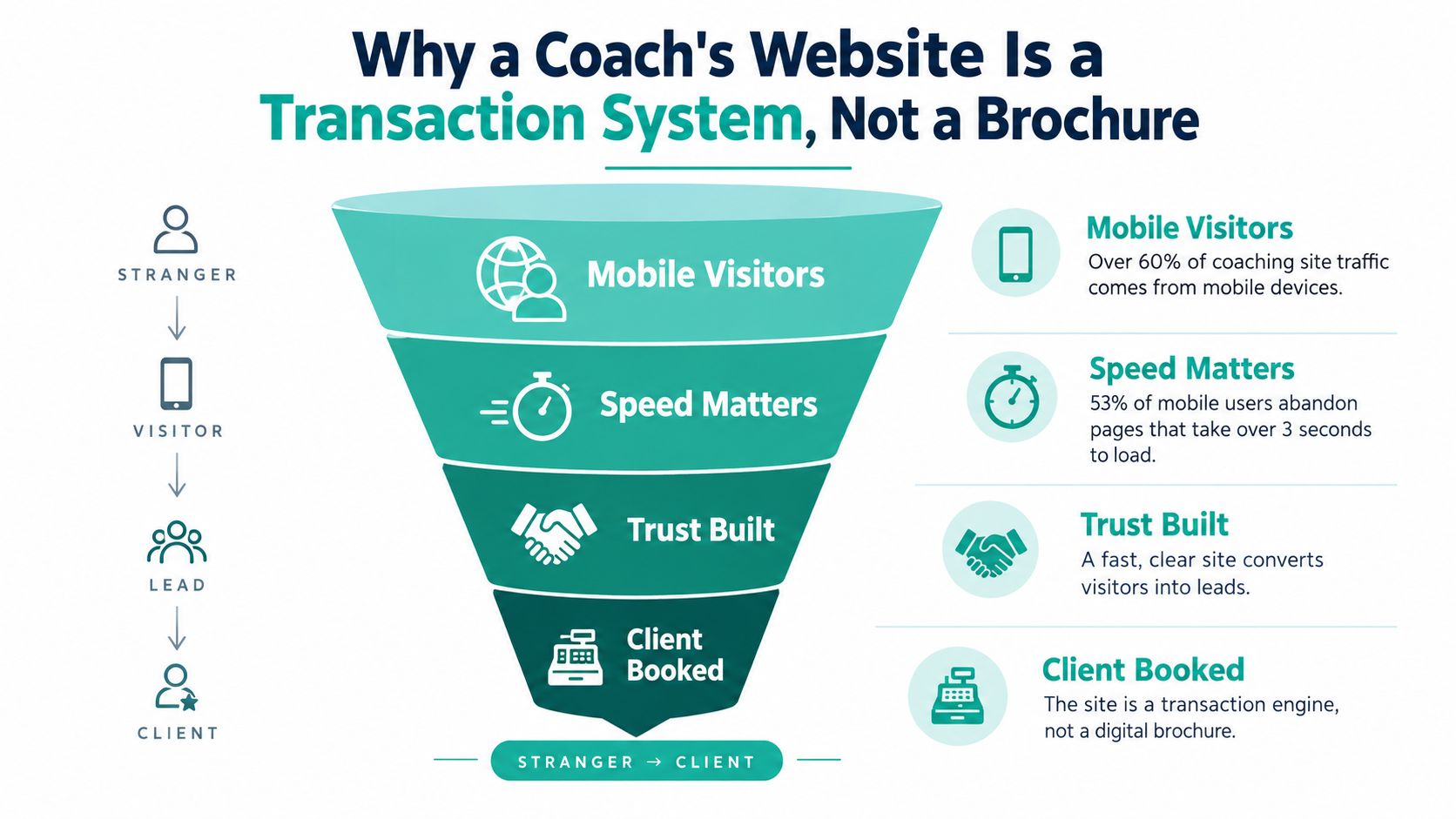
Table of Contents
- Why a Coach's Website Is a Transaction System, Not a Brochure
- The Minimum Viable Coaching Funnel
- Speed as a Booking Mechanism
- Lead Capture and Qualification Forms That Convert
- Template Builders Versus Prompt-Driven Builders
- How a Prompt-to-Funnel Launch Actually Works
- Keeping AI Output On-Brand and On-Ethics
- Your Coach Website Evaluation Checklist and Pricing Notes
Why a Coach's Website Is a Transaction System, Not a Brochure
A coach site is not a digital business card. It's the place where a stranger decides whether to book, apply, pay, or bounce back to Instagram. Once you accept that, the entire builder conversation changes, because a pretty homepage is useless if the path to revenue is clunky.
I've seen too many coaching sites loaded with brand poetry and zero operational muscle. The copy is warm, the photos are tasteful, and the navigation is full of feel-good labels, but the site still fails at the only thing that matters, moving a visitor from curiosity to commitment. A website builder for coaches should support that handoff on mobile first, because that's where a lot of traffic lands and where speed can kill or save the lead.
The ICF numbers make the market scale obvious, and Google's mobile research makes the execution problem obvious. If a page takes too long, the visitor never reaches the calendar, the checkout, or the application form. That means the first job of the builder is to keep the funnel alive long enough for trust to form.
Practical rule: if the site can't get a prospect to the next action quickly, it's not a marketing asset, it's décor.

For a coach, the four jobs are simple: capture, qualify, book, and charge. If the builder can't support those four jobs cleanly, it's asking the coach to stitch together half a dozen tools and hope the system doesn't fray at the seams. That's fairy dust, not operations.
The Minimum Viable Coaching Funnel
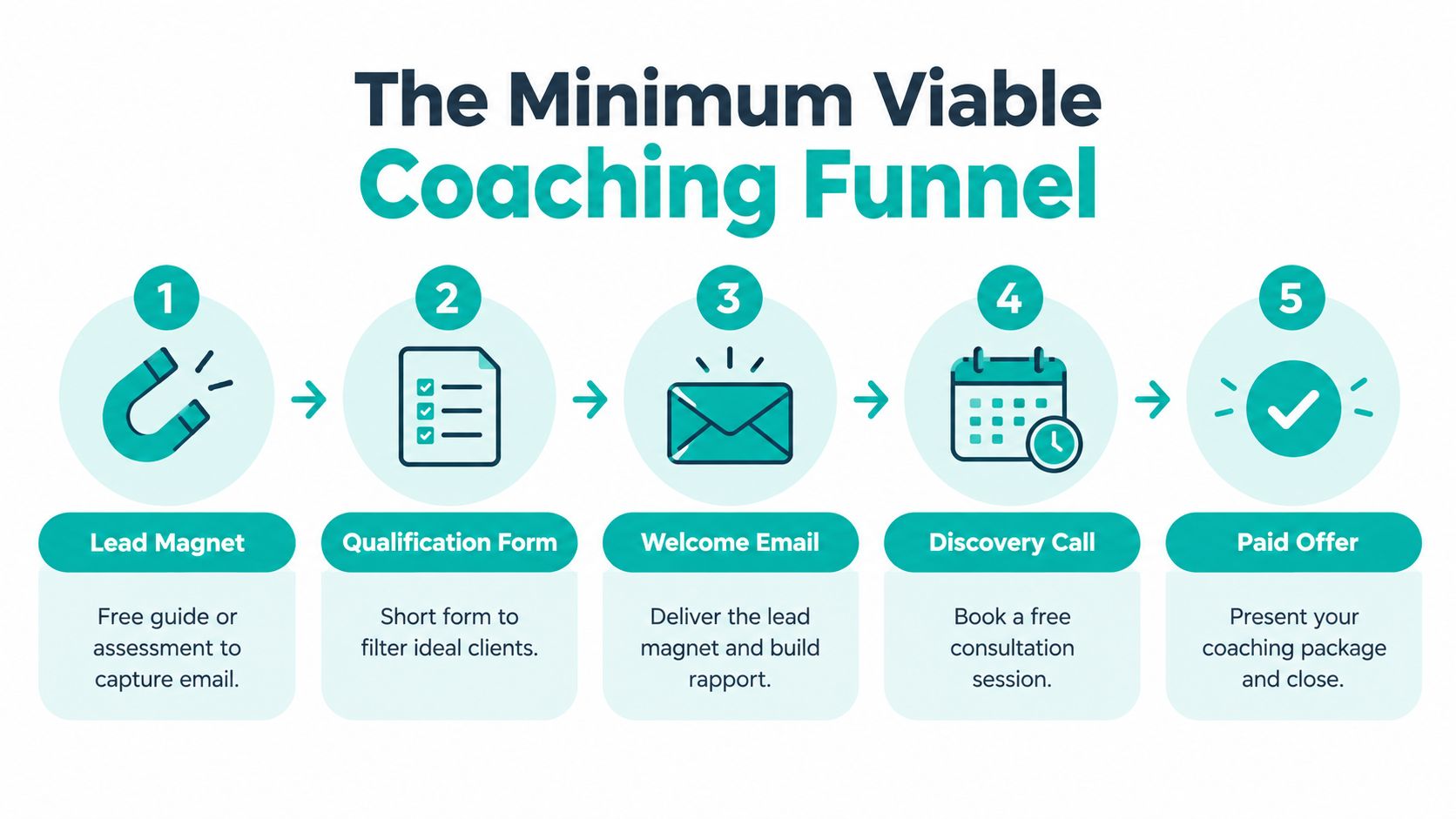
A coaching funnel needs five connected jobs: attract attention, check fit, schedule the next step, collect payment, and start onboarding. The lean version can begin with a lead magnet or diagnostic, continue through a short qualification form, route the prospect to a calendar or checkout, and finish with confirmation and onboarding. Extra pages add work unless the business model gives them a clear role.
Many coaches spend heavily on the front end while leaving the handoff manual. Page count matters less than whether the builder moves a prospect from interest to action without making the coach copy names between separate tools. NFIB reported that 82% of small businesses have a website, while only 19% of those websites accept payments. The gap shows how often a site establishes presence without completing the transaction. (NFIB small business technology survey)
What each step has to do
- Lead Magnet. A guide, checklist, quiz, or assessment earns an email address before asking for a purchase.
- Qualification Form. A short form identifies goals, budget, timing, and fit, protecting the coach's calendar from unsuitable enquiries.
- Welcome Email. The delivery message provides the promised resource, sets expectations, and states the next action.
- Discovery Call. A calendar lets qualified prospects choose a time without a long email exchange.
- Paid Offer. Checkout or a payment link completes the sale for packages, memberships, or programmes.
That sequence gives a coach a working transaction system. Premium coaching usually benefits from an application followed by scheduling after fit is confirmed. Lower-priced offers can send suitable visitors directly to checkout, reducing manual involvement before purchase.
Choose a builder that connects these steps in one customer path. Web Mage fits the prompt-to-page role by helping create and maintain the pages and workflows that support it. If a coach has to manage a landing-page tool, form tool, scheduler, payment processor, and email platform separately, the result is a patchwork of systems rather than one connected funnel.
Speed as a Booking Mechanism
A slow hero section can delay the one thing that matters: a prospect understanding the offer and booking the next step. Google defines Largest Contentful Paint as the time required to render the largest visible content element, often a hero image, heading, or video poster. Its guidance classifies 2.5 seconds or less as “Good,” 2.5 to 4 seconds as “Needs improvement,” and over 4 seconds as “Poor.” Use that standard to set a practical target for a coaching landing page. (Google Core Web Vitals guidance)
Speed affects the transaction directly. If the hero loads late, the value proposition arrives late too. The CTA feels less immediate, and mobile visitors have more time to leave before they understand why they should book.
What a serious optimizer should protect
Keep the above-the-fold promise light. Use appropriately sized hero images, preload only the critical asset, defer testimonials and video embeds, reserve space to prevent layout shifts, and restrict booking, chat, and tracking scripts. A coach does not need every widget running before a visitor can see the offer.
The commercial case is clear. Google's mobile research found that pages loading one second faster could see conversion-rate gains of up to 27%. A web vitals impact summary reported a 0.1-second improvement linked to a 10.1% increase in conversion rate. The same summary reported that Vodafone improved LCP by 31% and increased sales by 8%. (Web vitals and LCP impact summary)
Speed is part of the booking path. A prospect must see the promise before deciding whether to act.
An automated performance optimizer should keep monitoring the site after launch, not stop at setup. Podcast embeds, webinar replays, extra pixels, and payment widgets can gradually slow a previously quick page. Use this guide to optimizing website speed to identify avoidable drag, then test the booking path on mobile. A fast site protects attention, keeps the offer visible, and gives the CTA a fair chance to convert.
Lead Capture and Qualification Forms That Convert
Forms are where coaching funnels leak. If the structure is messy, the labels are vague, or the errors wipe out what the visitor already typed, people quit. W3C guidance is blunt about what good form design requires, clear structure, explicit labels, meaningful notifications, keyboard operability, and recoverable validation. (W3C form design guidance)
A coach application shouldn't feel like a tax return from a cursed kingdom. It should feel short, legible, and forgiving. That's especially important when the visitor is halfway convinced and needs one more calm nudge, not a wall of questions.
The form flow I'd actually ship
Start with name, email, and coaching goal. That's enough to begin a relationship without demanding the whole life story before the coach has even earned the right to ask for it.
Then use a multi-step form for deeper qualification. W3C recommends dividing longer forms into logical stages and communicating progress, which means the visitor should know how far they've come and what's left. If the form includes payment or scheduling later in the flow, the builder should preserve prior answers, support autofill, and keep the experience usable with a keyboard and screen reader.
Design rule: collect the minimum needed to move the person forward, then gather the rest after the booking or deposit.
Accessible forms also make analytics more useful. Instead of seeing one generic “abandonment” blob, you can spot where people leave, which fields break, and whether the problem is the first step, the calendar, or the handoff after checkout. That's the kind of data a coach can act on, because it separates a bad field from a bad offer.
How to improve conversion rate through better UX
Template Builders Versus Prompt-Driven Builders
Template builders give coaches control and familiarity. You drag sections around, pick a layout, and know roughly what the finished site will look like before you commit. That is useful if you want to tinker, or if you have time to babysit plugins, scheduling widgets, analytics add-ons, and optimization tools.
Prompt-driven builders start with the offer. You describe what you sell in plain language, and the system returns a complete funnel instead of a blank canvas and a long setup session. For a solo coach, that changes the math fast, because every hour spent assembling pages is an hour not spent coaching, selling, or serving.
Coach Site Builder Comparison
| Task | Template Builder | Prompt-Driven Builder |
|---|---|---|
| Launching a funnel | Manual setup across multiple pages and tools | Generates a connected funnel from a plain-language prompt |
| Editing copy and layout | Point-and-click changes on each page | Chat-based edits across the funnel |
| SEO upkeep | Usually handled with plugins or manual work | Automated by resident optimization systems |
| Speed maintenance | Depends on the owner noticing issues | Monitored and adjusted continuously |
| Split testing | Often needs extra software | Built into the system |
| Payment and qualification flow | Commonly stitched together from separate services | Can be handled in one flow |
| Ongoing admin load | Higher | Lower |
As noted earlier, if only 19% of small-business websites accept payments, most builders are still being used like brochure tools, not transaction tools. A restaurant directory or a personal portfolio can survive without payments. A coaching business cannot, because it has to qualify, charge, and follow up without hand-cranked admin. (NFIB small business technology survey)
That is the real choice for coaches. A template system gives you more manual control, but it also leaves more disconnected pieces for you to manage. A prompt-driven system cuts that sprawl down and keeps the funnel in one place, which is why a prompt-to-page option like Web Mage makes sense for coaches whose offers change often and who do not want to pull in a developer every time the copy shifts.
How a Prompt-to-Funnel Launch Actually Works
A new group program launch is the cleanest test case. In a prompt-driven system, a coach can describe the offer in one sentence, then get back the landing page, checkout, upsell, and thank-you pages as a connected funnel instead of a pile of separate drafts. That matters because the offer isn't just being published, it's being wired for action.
Once the first pass exists, the editing loop happens in chat. The coach can ask for a calmer headline, a tighter hero section, a different image treatment, or a shorter payment explanation without rebuilding the page by hand. That's the kind of workflow that keeps the launch moving when the launch window is small and every delay costs attention.
What the resident agents do after launch
SEO Seer crawls nightly, rewrites metadata, repairs broken links, and looks for more keyword opportunities. Speed Sprite compresses assets and trims bloat so the site doesn't slow down as it grows. Analytics Oracle reads traffic patterns and spots drop-offs and hot sections. Conversion Alchemist drafts A/B variants, routes traffic, tracks significance, and promotes the winner.
Those jobs aren't theoretical. Product examples cite LCP improvement from 2.4s to 1.1s and a +18% CTR lift on a pricing page, which is exactly the kind of evidence a coach wants when the goal is more booked calls and fewer dead clicks. The point isn't to obsess over numbers for their own sake. The point is to let the system keep looking for leaks after the launch rush is over.
A credit model can work for this kind of cadence because launches aren't constant. One month can fund the build, the next can fund refinements, and the owner doesn't have to pay for a bloated stack that's sitting idle between campaigns. That's a sane arrangement for a coach who runs focused offers instead of endless site redesigns.
Keeping AI Output On-Brand and On-Ethics
Coaches are right to be suspicious of generic AI output. Entrepreneur research found that 50% of respondents saw generic output as a major concern, 44% worried about data privacy, 39% said AI content often needs heavy editing, and 34% were uncomfortable trusting AI with important decisions. Those concerns get sharper in coaching, because the website isn't just selling a service, it's selling judgment and trust. (Squarespace entrepreneurship report 2025)
That doesn't mean AI has no place. It means the coach needs guardrails. I'd use AI for layout, metadata, image formatting, experimentation, and first-draft copy, then force human review on claims, testimonials, pricing language, and anything that touches sensitive client situations.
The approval workflow I'd trust
- Review claims manually. No outcome statement goes live without a human checking it.
- Separate public and private inputs. Marketing copy should never mix with confidential coaching notes.
- Control psychological language. Health or therapy-adjacent wording needs an explicit human check.
- Disclose when appropriate. If AI assisted the content, the brand should decide in advance how that's handled.
- Test for tone and inclusion. Fast output is useless if it sounds robotic or excludes the audience you want to serve.
Autonomy is useful only when it stays inside the brand's ethical fence.
That's the right way to think about an autonomous optimizer. Not as a replacement for judgment, but as a helper that takes the repetitive maintenance off the coach's plate without taking over the voice or the responsibility. For a coaching brand, trust is the asset, and the builder should protect it.
Your Coach Website Evaluation Checklist and Pricing Notes
Use this checklist before you pick any platform.
- Lead capture. Can it collect emails cleanly and connect the form to the next step?
- Qualification. Can it support short or multi-step application flows with recoverable errors?
- Scheduling. Can a visitor book a call without extra technical gymnastics?
- Checkout. Can it accept payment for programs or memberships on the same journey?
- Confirmation. Does it give a clear next step after booking or purchase?
- Speed monitoring. Does it help you keep pages fast after launch?
- SEO upkeep. Can it update metadata, crawl issues, and keep pages discoverable?
- Split testing. Can it run experiments without extra tools and manual wrangling?
- Trust controls. Can you review AI output, protect privacy, and keep the brand voice human?
If the answer to more than a couple of those is no, the builder is too flimsy for a coaching business that wants to sell online. A site should behave like a transaction system, not an online brochure with a contact form bolted on as an afterthought.
Web Mage's pricing is straightforward, $8 per month with 500 credits, plus 1,000-credit top-ups for $20. Monthly credits reset, purchased credits never expire, and hosting, SSL, and a .webmage.site subdomain are included on the same plan. That makes it easy to launch, test, and keep moving without collecting a drawer full of extra subscriptions.
If you want a coaching site that behaves like a real sales system instead of a decorative spellbook, visit Web Mage. It generates pages, funnels, copy, imagery, and styling from plain language, then keeps optimizing the site so the boring maintenance doesn't sit on your desk like a stubborn dragon.