
A one-second delay can reduce conversions by about 7%, and some mobile research reports losses of up to 20% for that same second of waiting, according to website-speed statistics compiled by Site Builder Report. That makes website speed more than a technical housekeeping task. It's a revenue spell, an SEO charm, and a courtesy to every visitor tapping your page on a busy phone connection.
Learning how to optimize website speed means learning which incantation to cast first. You'll measure the right runes, prioritize the asset that controls the first meaningful view, quiet scripts that hog the main thread, and keep watching after launch. A fast site isn't created by one heroic Lighthouse score. It's maintained through disciplined craft, field data, and a few helpful pixies who never sleep.
Table of Contents
- Why a Fast Site Is the Strongest Spell in Your Grimoire
- Reading the Runes of Core Web Vitals
- Compressing and Conjuring Images the Right Way
- Caching, Critical CSS, and Taming Render-Blocking Scripts
- Lazy Loading, Third-Party Scripts, and the Real-World Launch
- Monitoring After Launch With Autonomous Agents
- Your Speed Spellbook and Final Incantations
Why a Fast Site Is the Strongest Spell in Your Grimoire
A page that takes five seconds to arrive can convert far fewer visitors than one that appears in one second. The benchmark reports near 39% at one second and around 22% at five seconds, with performance declining as pages slow, according to Site Builder Report's website-speed research. Treat those figures as a warning rather than a forecast. Audience, offer, device mix, and funnel still shape the result.
Speed belongs in the foundation, alongside design and content. If the page arrives late, visitors may never see the layout you commissioned, read the headline you refined, or reach the checkout sequence you built. A faster experience can support search visibility, reduce abandonment, improve paid-traffic efficiency, and help more users complete the intended action.
For a startup choosing its first platform, performance should be part of the blueprint. A guide to choosing a website builder for startups helps you compare hosting, page structure, editing workflow, and technical overhead before you build a tower on shaky ground. The wrong foundation leaves every later speed spell fighting uphill.
Cast the business spell first
Begin with one question: what business outcome does slowness threaten?
- E-commerce: A delayed product page can interrupt browsing and weaken the path to purchase.
- SaaS: A slow landing page can waste paid clicks before a prospect understands the product.
- Lead generation: A sluggish form can turn high intent into abandonment.
- Content sites: A delayed article can make visitors doubt the experience before reading.
Then choose the first spell by consequence, not by whichever audit warning looks easiest. A perfect score on one machine will not protect every visitor. Core Web Vitals brought loading, responsiveness, and visual stability into mainstream SEO and product work after their introduction in 2020, followed by use as a ranking-related signal in 2021. The practical aim is steadier: meet thresholds that real users can feel, then protect those gains as pages, campaigns, and integrations change.
Practical rule: Fix the slowest user-visible bottleneck before polishing a low-impact technical detail.
Treat optimization as a monitoring ritual, not a single cleanup. Read the runes, improve the largest visible asset, clear the render path, and tame third-party scripts. After launch, keep watching. New content and integrations can set fire to yesterday's carefully prepared robes.
Reading the Runes of Core Web Vitals
Before changing code, read the page's signals. Core Web Vitals are three runes for loading, responsiveness, and visual stability. Google evaluates them through the 75th percentile of real-user data at page or origin level, so a quick laboratory visit does not guarantee a quick experience for your audience. The Google Core Web Vitals documentation explains the thresholds and measurement context.
Learn the three runes
Largest Contentful Paint, or LCP, records when the largest visible element, such as a hero image, headline, or prominent panel, appears. Aim for 2.5 seconds or less. Above 4.0 seconds is poor, according to CoreWebVitals.io's LCP guidance. The LCP element is the first suspect when the opening view feels slow.
Interaction to Next Paint, or INP, measures the delay between a click, tap, or keystroke and the next visual response. Keep INP at or below 200 milliseconds for a good experience. Long JavaScript tasks often hold this rune captive.
Cumulative Layout Shift, or CLS, measures unexpected movement while the page loads. A good page keeps CLS at or below 0.1, so text, buttons, and forms stay where visitors expect them.
| Vital | What It Measures | Good Target |
|---|---|---|
| LCP | How quickly the main visible content appears | 2.5 seconds or less |
| INP | How quickly the page responds to interaction | 200 milliseconds or less |
| CLS | How stable the layout remains during loading | 0.1 or less |
Measure before you enchant
Use PageSpeed Insights for lab diagnostics alongside available field data. Run Lighthouse for repeatable checks during development or deployment. The Chrome User Experience Report shows how visitors experience eligible pages, while the Web Vitals Chrome extension gives immediate feedback as you browse.
Write down a baseline before casting changes. Record the failing rune, affected page or template, device context, and responsible element or script. For LCP, inspect the largest visible element. For INP, examine JavaScript execution and long tasks. For CLS, search for images, ads, fonts, or embedded components that arrive without reserved space.
The apprentice's usual mistake is treating every warning with the same spell. Compressing an image will not free an interface blocked by a giant JavaScript bundle. Removing a script will not repair a hero image delivered at the wrong size. Let the failing rune choose the remedy, then repeat the check after each meaningful change. Speed is a maintained enchantment, not a single cleanup ritual.
Compressing and Conjuring Images the Right Way
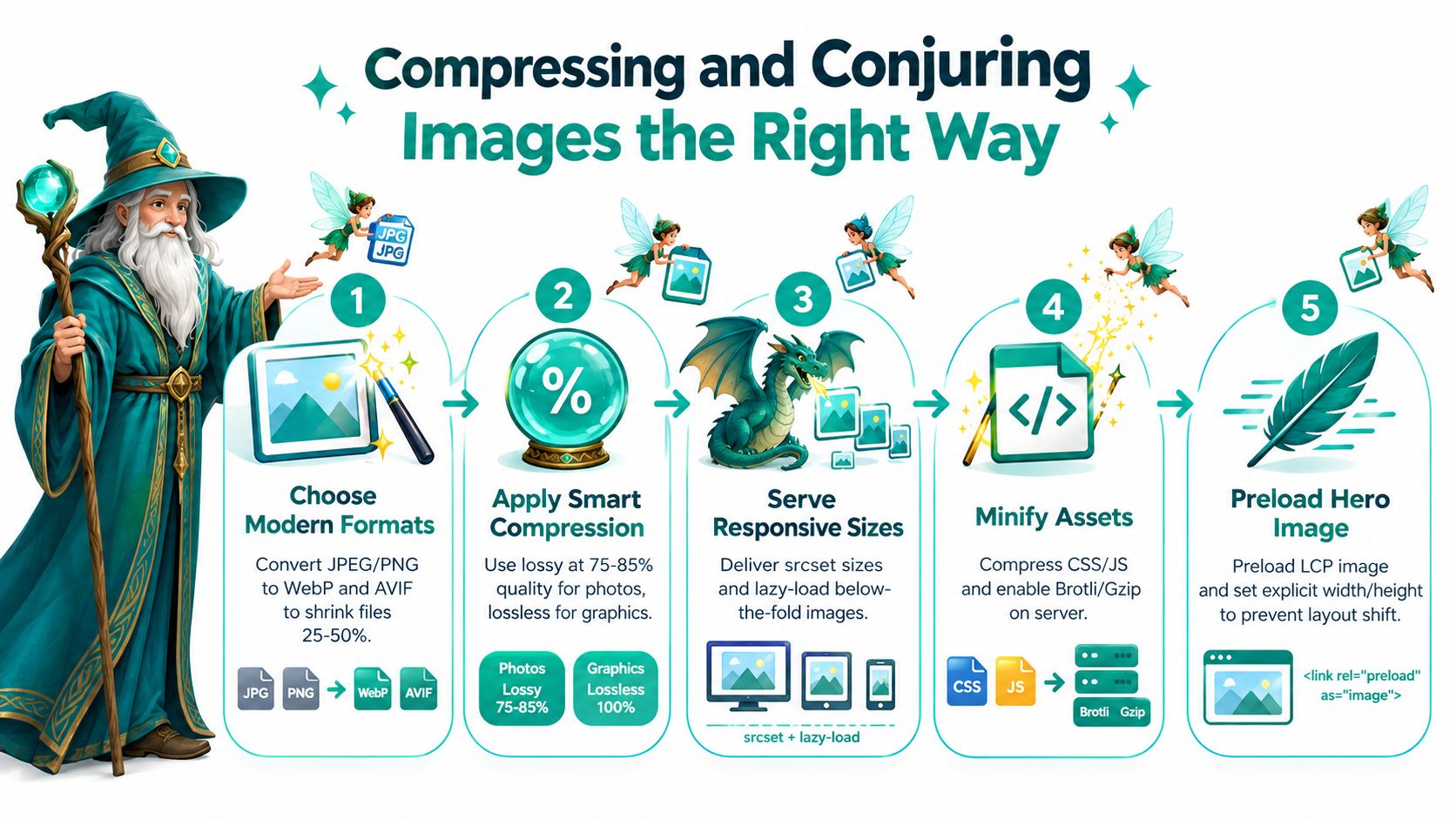
Images often hold the heaviest cargo in the browser's cart. One industry summary citing the Web Almanac reports that images make up 48% of median page weight and serve as the LCP element on about 85% of desktop pages and 76% of mobile pages, as reported by Logos Web Designs. Find the image controlling LCP before you sprinkle lazy-loading dust everywhere.
Choose the right vessel
Serve photographs and illustrations in WebP or AVIF where browser support allows it, and keep suitable fallbacks for older environments. These formats can shrink files substantially compared with older JPEG and PNG versions, but don't rely on a universal compression setting. A product photograph, transparent logo, and detailed illustration each need a different balance between visual quality and file size.
Use responsive delivery rather than sending one oversized painting to every visitor. The srcset and sizes attributes let the browser choose an appropriately scaled asset for the viewport and layout. Resize the source before compression, remove unnecessary metadata, and inspect the result on both a sharp desktop display and a modest phone.
Prioritize the hero
Identify the LCP asset in the page markup and make its request easy for the browser to discover. A preload hint can help the browser begin fetching that important image sooner, while explicit width and height values reserve its space and reduce layout movement. Don't lazy-load an above-the-fold hero or LCP image merely because a plugin offers a global switch.
Web.dev measurements report a median 75th-percentile LCP of 2,922 milliseconds without lazy loading and 3,546 milliseconds with lazy loading. In a WordPress subset, the corresponding figures were 3,495 milliseconds and 3,768 milliseconds. The lesson is precise: lazy-load media below the fold, but let the first visible artwork enter the scene promptly.
Keep fonts from becoming invisible chains
Fonts can delay text or shift its position. Use font-display: swap, preload only the necessary WOFF2 subsets, and limit the number of weights your design uses. Pair font decisions with layout testing, because a font that appears late can alter line wrapping and move nearby content.
Compression also won't cure a JavaScript-heavy page. After the LCP image is protected, inspect main-thread work and remove unused scripts so the browser can paint and respond without a dragon sitting on the CPU.
Caching, Critical CSS, and Taming Render-Blocking Scripts
A browser cache is a protective ward for returning visitors. Configure Cache-Control headers for static assets, use ETag where it fits your delivery model, and mark fingerprinted files as immutable when their filenames change whenever the contents change. Hashed filenames make cache-busting safer because a new asset receives a new name instead of forcing every visitor to guess whether an old file is still valid.
Server-side caching handles a different layer. Cache generated HTML where the page permits it, use opcode caching for compiled server code, and add object caching for repeated data lookups. A CDN can place static resources closer to visitors and reduce the distance those assets travel. These wards work together, but they need exclusions for personalized pages, carts, account areas, and other content that must remain fresh.
Give the first view a clear path
Critical CSS is the minimum styling needed to render the above-the-fold portion of a page. Extract it with tools such as Critters or Penthouse, inline the result in the document, and load the remaining styles without blocking the first visual moment. Inspect the rendered page after extraction. An over-aggressive cut can remove styles that the first screen needs.
Scripts require more careful sorting. Use defer for scripts that should download without blocking HTML parsing but execute after the document is parsed. Use async for independent scripts whose execution order doesn't matter. Split large bundles, load route-specific code dynamically, and let tree-shaking remove exports that no page uses.
A script doesn't become harmless simply because it's small. Ask whether it must run before the visitor can see or use the page.
Protect the main thread
INP often suffers when JavaScript monopolizes the main thread. Break long tasks into smaller pieces, reduce hydration work, remove redundant libraries, and delay non-critical third-party code. Be cautious with analytics or A/B testing scripts that appear visually harmless. If one controls page content, personalization, layout, or experiment assignment needed for the first render, deferring it blindly can create a blank or incorrect experience.
Use this compact review after each deployment:
- Browser wards: Confirm cache headers and safe invalidation.
- Server wards: Check HTML, opcode, and object caching.
- Style path: Inline the minimum critical CSS and defer the rest.
- Script order: Apply
deferorasyncaccording to dependency needs. - Bundle shape: Split routes and remove unused code.
- Interaction readiness: Break long tasks and verify INP with field data.
Lazy Loading, Third-Party Scripts, and the Real-World Launch
A small apothecary shop opened its first online storefront with a warm hero photograph, a product gallery, a map embed, customer chat, analytics, and a review widget. The owner clicked publish, tested the page on a fast laptop, and declared the potion ready. On ordinary phones, the chat widget competed with the hero image, a late font shifted the product grid, and off-screen embeds consumed bandwidth before anyone reached them.
The thoughtful launch started by sorting each asset according to its place in the visitor's journey. Images and iframes below the fold received loading="lazy". A custom product component used Intersection Observer to begin loading when it approached the viewport. The hero image stayed eager because it controlled LCP.
Audit every outside spell
Third-party code deserves an owner and a reason. Create a small inventory for chat, analytics, advertising, fonts, reviews, maps, and experimentation tools. For each entry, record who owns it, what decision it supports, where it loads, and what it costs in network and main-thread work.
Then choose the least disruptive treatment:
- Keep essential code: Load the integration early only if the page visibly depends on it.
- Delay useful extras: Start chat, reviews, or tracking after the first meaningful view when their immediate presence isn't necessary.
- Self-host selectively: Host stable fonts or approved assets yourself when that removes an avoidable external connection.
- Remove duplicates: One analytics path is easier to govern than several overlapping tags.
- Watch interactions: Test the page while opening menus, selecting options, and submitting forms, not just while staring at the first paint.
The shop served static assets through a CDN with Brotli compression, preloaded the required font subset, reserved image dimensions, and delayed the map until a visitor reached its section. Each decision had a metric attached. The team checked whether LCP improved, whether CLS settled, and whether INP stayed responsive after the widgets appeared.
| Decision | Naive Setup | Thoughtful Setup |
|---|---|---|
| Hero image | Lazy-loaded with the rest of the gallery | Prioritized and delivered at a responsive size |
| Product gallery | Every image requested immediately | Below-the-fold images loaded on approach |
| Chat widget | Downloaded during the first render | Delayed until it was useful |
| Fonts | Several weights loaded without layout planning | Limited WOFF2 subsets with font-display: swap |
| Map and embeds | Loaded on page entry | Loaded when the visitor reached the relevant area |
| Delivery | Assets served without a clear edge strategy | CDN delivery with Brotli for supported text assets |
For owners building a storefront with plain-language tools, this guide to building a website with AI offers another way to think about structure and automation. The principle remains the same, whether a human mage writes the code or a tool assembles it. Every resource must earn its place in the opening ritual.
Monitoring After Launch With Autonomous Agents
A single Lighthouse run is like casting a clarity spell once and trusting the weather to stay obedient. Campaigns add videos, plugins inject scripts, redesigns change the LCP element, and font updates can shift the page. The page measured last week may differ from the one visitors receive today.
Synthetic testing provides a controlled view. Lighthouse runs, CI checks, and scheduled tests can follow consistent routes and environments, so they help catch regressions before deployment. Real-user monitoring, or RUM, records what happens on actual devices, networks, locations, and page conditions. It can reveal a slow interaction or layout shift that a tidy laboratory run never encounters.

Set the alarm bells
Use the Core Web Vitals thresholds as acceptance criteria:
- LCP: Alert when the 75th-percentile result rises above 2.5 seconds.
- INP: Investigate when the 75th-percentile result exceeds 200 milliseconds.
- CLS: Triage when the 75th-percentile result climbs above 0.1.
- Deployments: Compare field and synthetic results before and after meaningful releases.
These numbers describe whether visitors can see the primary content, interact without waiting, and trust the page to remain steady. Google's field assessment uses the 75th percentile, so an average can hide a sizeable group receiving a poor experience. Keep that percentile in the acceptance ritual, as noted earlier in the article.
Prefer a living ritual to a monthly checklist
The 2024 Web Almanac summary describes continued web-performance improvement while noting that only a minority of sites fully pass all Core Web Vitals, with some industry summaries placing the share near 33%. More recent field reporting also shows that mobile passing performance rose from 36% in 2023 to 44% in 2024 and 48% in 2025, while only 48% of mobile origins and 56% of desktop origins passed all three metrics, with mobile LCP passing at about 62%, according to NexureSoft's performance summary. The lesson is practical: speed remains a changing condition, not a cleanup task completed once.
A continuous monitoring system can watch trends, identify the template or device group that deteriorated, connect a regression to a deployment, and recommend a focused fix. Autonomous agents are useful because they continue reviewing field signals after the launch team has moved to the next campaign. Web Mage's resident agents follow the same pattern, keeping the monitoring ritual active after launch rather than treating optimization as a one-time spell.
Use a weekly operating cadence:
- Review dashboards: Find movement in LCP, INP, CLS, and key conversion paths.
- Triage regressions: Segment by template, device, connection, geography, and release.
- Ship one targeted fix: Change the resource or behavior tied to the evidence.
- Re-measure: Confirm the fix in synthetic checks and real-user data.
- Record the outcome: Keep a short performance log so future mages recognize recurring curses.
A 2025 analysis of 208K websites found that only 46.7% of desktop sites and about 40% of mobile sites met good thresholds for all three Core Web Vitals, while roughly 30% of mobile sites scored poorly on INP because JavaScript blocked interaction, as reported by Increv's Core Web Vitals study. That evidence supports a wider practice. Image work matters, yet main-thread work deserves equal attention. A passing lab snapshot cannot stand in for continued observation of real visitors.
Your Speed Spellbook and Final Incantations
A reliable speed practice follows an order. Start with evidence, protect the first visible content, clear the rendering path, and then keep watch. The following checklist turns the craft into a sequence an apprentice can follow.
Write the ritual in order
- Measure Core Web Vitals: Audit LCP, INP, and CLS with PageSpeed Insights, Lighthouse, and available field data. Record the failing template and element before editing.
- Compress images to AVIF or WebP: Convert suitable JPEG and PNG assets, remove excess dimensions, compress them, and serve responsive sizes through
srcsetandsizes. - Preload the LCP asset: Help the browser discover the hero image early, set explicit dimensions, and never lazy-load the visible LCP asset.
- Ship critical CSS: Inline the styling required for the first view, then defer non-critical styles after checking the rendered result.
- Defer non-critical JavaScript: Use
deferorasyncaccording to dependencies, split bundles, delay third parties, and break long tasks that threaten INP. - Enable caching wards: Configure browser caching, server-side caching, CDN delivery, compression, and safe cache invalidation for changed files.
- Lazy-load below-the-fold media: Apply lazy loading to off-screen images and iframes, and use Intersection Observer for components that need custom behavior.
- Audit third-party scripts: Give every tag an owner, purpose, and cost. Remove duplicates and delay anything that doesn't serve the first interaction.
- Monitor continuously: Combine synthetic checks with RUM, deploy comparisons, trend review, and autonomous alerts.

Two beginner mistakes appear again and again. The first is lazy-loading the hero image, which delays the asset that defines LCP. The second is allowing marketing tags to pile up without an owner or performance review, until the main thread resembles a dragon's treasure hoard.
Let every improvement compound
Speed gains stack because each layer removes a different obstacle. A smaller hero image reduces transfer work. Early discovery improves its place in the request queue. Critical CSS helps the browser render sooner. Deferred scripts leave more room for interaction. Caching protects repeat visits, while RUM tells you when a new feature has disturbed the balance.
For teams that want an automated option, Web Mage's AI website builder for small businesses combines prompt-based page creation with a Speed Sprite that compresses assets, lazy-loads media, and prunes bloat. Treat that as one possible workflow, not a substitute for understanding your metrics. The strongest operators still define the acceptance criteria, inspect the evidence, and verify that an optimization helps real visitors.
A fast site doesn't need to perform one perfect trick. It needs a well-maintained spellbook, a watchful mage, and fewer unnecessary creatures blocking the doorway. Keep measuring, fix the bottleneck that matters, and remember the Web Mage principle: fast sites cast the strongest conversion spells.
Web Mage can generate complete pages and funnels from plain-language prompts, then use autonomous agents to monitor SEO, performance, analytics, and conversion signals after launch. Visit Web Mage to create a site, set up its speed ritual, and let its resident optimization tools keep watch as your business grows.