
You built the page. The headline is sharp, the hero image is the one your designer showed the whole office, and the offer is good. Then a week passes, Search Console shows a trickle of impressions, the bounce rate looks like a cliff, and the only form submissions are from your own team testing the button.
That's rarely a design problem or a content problem. It's usually one of seven small things, and six of them sit outside the headline where everyone keeps polishing.
A landing page has two jobs. It has to be found for one specific query, and it has to convert the person who typed that query. Ranking alone pays badly: the top organic result in 2025 averaged a 27.6% click-through rate across roughly 4 million search results, according to click-through rate benchmarks published by Clienvora. A lovely prize, and worth nothing if the page it sends people to doesn't close.
The first rule of the craft: a landing page that ranks without converting is a dragon guarding an empty cave. Magnificent silhouette, nothing inside.
Table of Contents
- Your Landing Page SEO Checklist at a Glance
- How to Match Search Intent to One Landing Page
- Titles, Headings and Meta Descriptions That Align
- Mobile Parity, Indexing and Schema Basics
- Core Web Vitals Targets and How to Hit Them
- Protecting Conversions While You Speed Up Your Page
- Run Your First Landing Page Audit This Week
Your Landing Page SEO Checklist at a Glance
Every audit starts in the same place, and it isn't the <head> section. It's the phone in your hand. Google evaluates the smartphone version of a page as the primary version, and by March 2020 it reported that about 70% of the sites appearing in its search results had already shifted to mobile-first indexing, per Google's mobile-first indexing announcement. Fix the small screen first, or you're polishing a mirror.
Seven checks cover the whole page. Each one has a target and a place to look, which matters more than it sounds, because most failed audits are failed location problems rather than judgment calls.
| Check | Target | Where to Fix It |
|---|---|---|
| Search intent | One clear query and one conversion goal | Headline and first paragraph |
| Title tag | Unique, clear, concise and accurate | HTML title element |
| H1 | Restates the title's promise in plain words | Visible top headline |
| Meta description | One or two succinct sentences | Meta description tag |
| Mobile version | Same copy, headings, links and CTAs as desktop | Responsive template |
| Canonical URL | One preferred URL for the landing page | Canonical link tag |
| Schema | Markup matches the visible content | Structured data on the page |
Run it like a spell check on a scroll. Load the page on a phone, walk the seven rows, mark each pass or fail, then repeat on desktop. One missing ingredient spoils the batch: a mobile form that pushes the offer behind a tab, or a canonical tag pointing at a staging URL, can undo a page that looks flawless on a 27-inch monitor.
If your page sells a service in a specific city, the landing page SEO checklist for local services from LPagery adds the location rows this general scorecard leaves out.
Failing rows are a to-do list, not a verdict. Fix the page that already earns the most traffic first, since that's where a repaired title or a restored mobile CTA pays back fastest. Save the filled-in table as a scorecard and rerun it after every change. The rest of this guide walks the rows in order, starting with the one that decides all the others.
How to Match Search Intent to One Landing Page
A dog-walking company wants one page to catch both "best dog walker near me" and "how much does dog walking cost". What gets published is a stock photo of a golden retriever, three paragraphs about a lifelong love of animals, a price table halfway down, and two buttons that both say Learn More. It ranks respectably for neither query and converts the few visitors who stay.
The page is trying to be two pages. One visitor is comparing providers and wants reviews, insurance details and a booking button. The other is pricing, and won't read a word until they see a number. Serving both from one headline means serving neither well.
Here's the split, drawn out plainly.
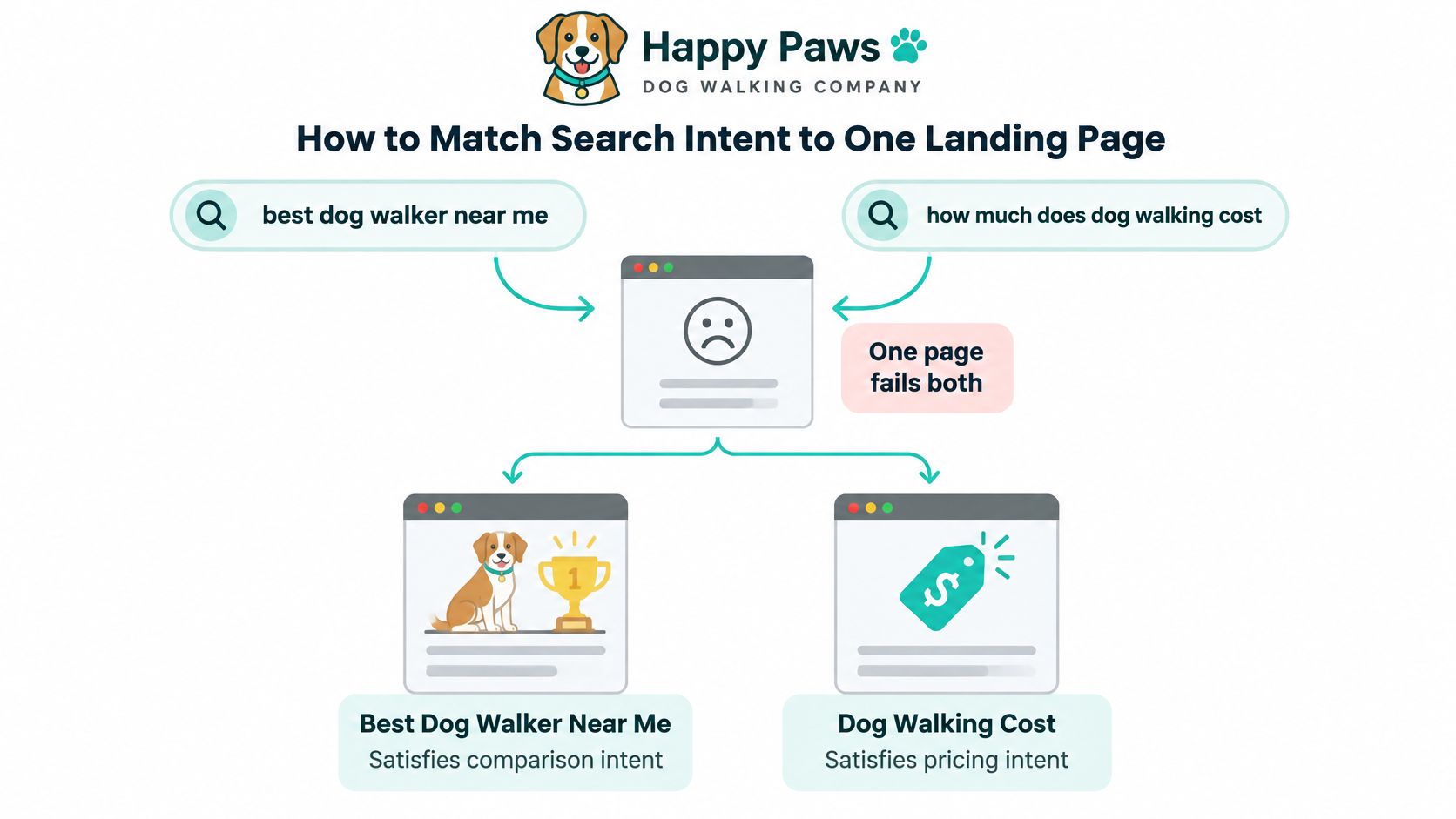
| Intent | Dog-walking example query | Page treatment |
|---|---|---|
| Buying | best dog walker near me | Primary query for the H1, first paragraph and one booking call to action |
| Learning | how much does dog walking cost | Secondary query for a subheading that gives the price range |
| Comparing | dog walking company reviews | Secondary query for the proof section only |
The routine that gets a page from confused to focused:
- Pull the queries you already half-own. In Search Console, filter to the page, then export every query that produced impressions. A phrase you believe you should rank for but have never appeared for is a wish, not a plan.
- Sort them by intent. Learning, comparing, buying. Most landing pages can win one group and support the other two.
- Pick one primary query. Choose the phrase with the clearest commercial match. That single phrase goes in the H1 and in the first paragraph, spelled the way a customer would say it out loud.
- Answer it in two sentences. Somewhere in the first screen, name the offer, the audience and either the price range or the next step. No preamble about founding values.
- Place the primary query properly. Once in the H1, once in the opening paragraph, and once in the title tag. Beyond that, write like a human being, because repetition reads as desperation.
- Choose one conversion goal. One button, one destination. Remove the navigation links, the newsletter popup and the chat bubble that opens itself, all of which offer a visitor somewhere else to go.
- Read the page aloud from the query. If someone typed the primary phrase and landed here, would they have their answer inside five seconds?
Secondary queries earn their place through subheadings, never through a second headline. A pricing H3 can answer the cost question without dragging the page sideways into a cost explainer.
The test at the end is brutal and quick. If the page answers a different question than the one typed into the search bar, it will rank badly and convert worse, and no amount of green scorecard rows will save it.
Titles, Headings and Meta Descriptions That Align
A bookkeeping service for freelancers publishes a page titled "Pixie Dust Bookkeeping for Freelancers" and then opens with a visible H1 that reads "Welcome to Our Services". Two promises, one page, and Google gets to choose which one it believes.
Google can build the title link from the HTML title element, the page's main visual title, heading elements such as the H1, Open Graph title metadata, prominent styled text, anchor text, linked-page text and WebSite structured data, as set out in Google's guidance on title links and snippets. Which means you don't cast the title with one line in the head section. You cast it with everything visible at the top of the page.

Run the alignment test
Read four things aloud in order: the title tag, the H1, the visible offer, the first subheading. If they promise the same thing in slightly different words, you're done. If the H1 says "Welcome to Our Services" while the title says freelancer bookkeeping, Google may rewrite your title into something generic and the visitor gets a page that opens with a shrug.
A good title is unique to the page, clear, concise and accurate. "Unique" is the row most sites fail, because nine out of ten product pages share the same template and the same five words.
Why alignment now pays twice
Search results aren't the only place a title gets read. In an analysis of 158,099 AI answers, pages with stronger title-to-question alignment received 14.1% more citations per standard deviation, and stronger alignment between the user's question and the page's best paragraph correlated with 15.5% more citations, per Similarweb's AI search optimization research. Write the title as the answer to the question, and the paragraph that best answers it near the top, and both the blue link and the machine summary find you.
The meta description still has a job, though a smaller one than commonly assumed. Google usually draws snippets from visible page content and sometimes uses the description instead, so treat it as one or two succinct sentences summarizing the offer, not a dumping ground for keywords. Our walkthrough on how to write meta descriptions that earn clicks covers the phrasing that survives truncation.
Heading structure finishes the job. One H1, then H2s that each answer a buyer question in order, price, coverage, proof, next step. That's scannable for a human and extractable for a search system, which is the same favour done twice.
Mobile Parity, Indexing and Schema Basics
Google indexes and ranks the smartphone version of a page, which turns mobile parity from a design preference into a hard technical requirement. The cleanest way to satisfy it is responsive design that serves the same HTML on the same URL across devices, as Google's mobile-first indexing documentation sets out, rather than a separate mobile page that drifts out of sync the first time someone edits the desktop copy.
Google also warns that content requiring a user interaction, such as swiping, clicking or typing, to load may never be loaded at all. Your pricing table behind a "See plans" accordion and your FAQ behind a tap are invisible to the crawler that decides whether you rank.
Run these six checks in order:
- Compare copy and headings word for word. Export the mobile HTML and the desktop HTML, then diff the text. If the phone version is missing a guarantee, a price, or the last two paragraphs of proof, it isn't a shorter page, it's a weaker one.
- Confirm links and calls to action on a real phone. Tap the booking button with a thumb. Watch for the CTA that sits below a full-screen image and never gets scrolled to.
- Check title and meta description match across versions. A mobile template that drops the title element hides the ingredients from Google's indexing familiar entirely.
- Verify structured data matches what the visitor sees. When you have to prioritise, Google recommends Breadcrumb, Product and VideoObject markup. Never mark up a rating, a price or a video that isn't on the page.
- Point the canonical tag at one URL. One preferred address per landing page, self-referencing on the live page, and never aimed at a staging or parameter-laden copy.
- Hunt duplicate campaign variants. A page that accepts
utm_sourcevariants and returns them indexable creates five pages competing with each other for one query.
Structured data deserves the extra minute. Schema is a promise to the machine about what's on the page, so a Product block on a page with no purchasable product is a spell with no ingredients, and Google treats mismatches accordingly.
Field note: the mobile page isn't a smaller version of the real page. It is the real page. The desktop view is the dress rehearsal.
Core Web Vitals Targets and How to Hit Them
A landing page is the worst-case page for performance, because it stacks a hero image, a form, a tracking tag for every channel and a video the sales team insisted on. Three numbers decide whether a visitor stays long enough to read the offer.
Google classes a page as good at an LCP of 2.5 seconds or less, an INP of 200 milliseconds or less and a CLS of 0.1 or less, with anything past 4 seconds, 500 milliseconds or 0.25 graded poor, according to Google's page experience thresholds.
| Metric | Good | Poor | What It Measures |
|---|---|---|---|
| LCP (Largest Contentful Paint) | 2.5 seconds or less | Over 4 seconds | Loading speed of the main content |
| INP (Interaction to Next Paint) | 200 milliseconds or less | Over 500 milliseconds | Responsiveness to taps and clicks |
| CLS (Cumulative Layout Shift) | 0.1 or less | Over 0.25 | Visual stability while the page loads |
The same three numbers, drawn as what the visitor feels.
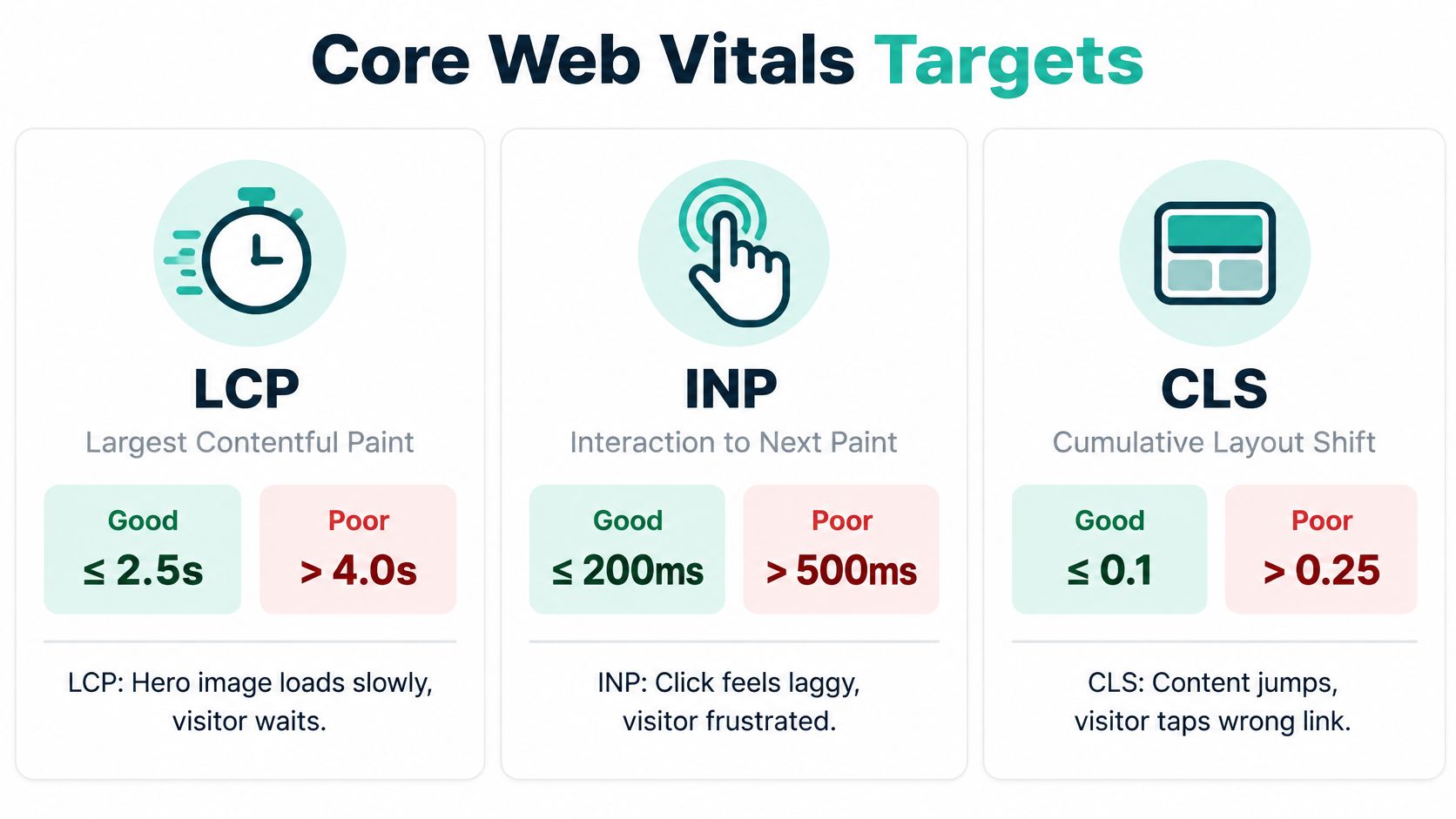
- LCP feels like waiting. The headline block or hero photo stays blank while a spinner turns, and the visitor starts deciding whether they need a dog walker today.
- INP feels like a dead button. A thumb hits Book a Call, nothing happens for a beat, so the thumb hits it twice and lands on a double submission or leaves.
- CLS feels like the page is fighting back. The form slides down as a chat widget inflates, and the visitor taps the wrong field, or the wrong link.
The field-data loop that beats a lab score
Lighthouse tests one page on one machine on one network. Google ranks from real visitor data, so the loop has to start there. Google's current targets are an LCP of 2.5 seconds or less, an INP below 200 milliseconds and a CLS below 0.1, and the working method is a field-data cycle rather than a single audit, as outlined in Google's Core Web Vitals guidance:
- Confirm the page still matches one query and one conversion goal. A fast page aimed at the wrong visitor converts nobody, quickly.
- Open the Core Web Vitals report in Search Console and read real-user data, which groups URLs as Good, Needs improvement or Poor.
- Fix the highest-impact bottleneck on that URL group, not the most interesting one.
- Wait for enough traffic, then recheck the same URL group rather than a nearby page that happens to look similar.
- Compare organic impressions, CTR, rankings and conversions before and after, split by device.
The order that saves the most seconds
Preload the hero image and the single font the headline uses. Set explicit width and height on every image, video and embed so nothing moves when they arrive. Defer JavaScript the first screen doesn't need, including chat widgets and personalisation scripts. Then audit third-party tags and delete the ones nobody can name an owner for. If the page still drags after that, Polish's guide to fixing slow-loading pages works through the render-blocking layer in more depth.
Three pitfalls waste most of the effort:
- Optimizing desktop only. Field data comes from phones on patchy mobile networks, which is where the poor grades live.
- Chasing a perfect lab score. A test server can produce a flawless number while a mid-range Android waits four seconds for the hero image.
- Changing copy, design and speed at once. When conversions move, you've learned nothing about which change caused it.
For per-metric diagnostics, our guide to improving Core Web Vitals breaks down what to instrument for each one.
Protecting Conversions While You Speed Up Your Page
Say a growth team runs a page with a client logo wall, a forty-second explainer video and an animated headline. The speed audit says the hero is competing with three scripts. Someone cuts the logos, swaps the video for a poster, kills the animation, and earns a green score. Two weeks later the form starts fall off a cliff.
Nothing about that page got faster for no reason. The proof got deleted.
Performance is weak across the web, and conversion does vary by where the visitor came from. Only 46.0% of sampled mobile landing-page origins passed all three Core Web Vitals, against 52.8% of all origins in the same comparison, and the reported median conversion across more than 41,000 landing pages was 6.6%, with Google Search traffic converting at 11.3% and Instagram traffic at 17.9%, per landing page benchmark data compiled by Octo. Those two facts together kill the idea of one universal landing page layout. A high-intent searcher wants immediate proof, pricing clarity and a short form. A social visitor wants education and visual reassurance first.
Speed still moves money, so don't read this as permission to ship a slow page. Google reports that 53% of mobile visits are abandoned when a page takes longer than three seconds to load, and that in retail each additional second of load delay can reduce conversions by up to 20%, according to Google's mobile page speed benchmarks. Treat those as population benchmarks, not a forecast for your category. The useful signal is which of your own pages fail the thresholds, not which statistic sounds scariest in a slide.
| Element | Verdict | SEO Effect | Conversion Risk |
|---|---|---|---|
| Hero image | Keep, compress and size it | Helps LCP when optimized | Low when compressed |
| Testimonial logos | Keep, lazy-load below the fold | Adds trust signals without blocking render | Low |
| Explainer video | Defer until the visitor interacts | Can slow LCP and INP if loaded early | Medium for cold traffic |
| Third-party tracking scripts | Cut unused ones, defer the rest | Reduces blocking JavaScript | Low after an audit |
| Long lead form | Shorten or progressively reveal fields | Neutral for rankings | Can cut qualified leads |
| Animated intro | Cut | Can delay content and cause layout shifts | Low |
Lighter alternatives beat deletions. Compress the proof images to modern formats. Swap autoplay video for a poster frame and a play button that loads the player on intent. Server-render the key copy so the offer arrives with the HTML. Reveal form fields in steps, asking for the email before the phone number, so the page feels shorter than it is.
Change one major element at a time and segment results by traffic source, device and intent. Otherwise a win from search traffic gets averaged with a loss from social and cancelled out.
The rule of thumb: if removing an element speeds up the page but also removes the reason someone would buy, keep the element and make it lighter instead.
Run Your First Landing Page Audit This Week
A week is enough to find out whether the page is broken or merely unlucky. No wand required, just a schedule.
Here's the shape of a proper audit before you open Search Console.
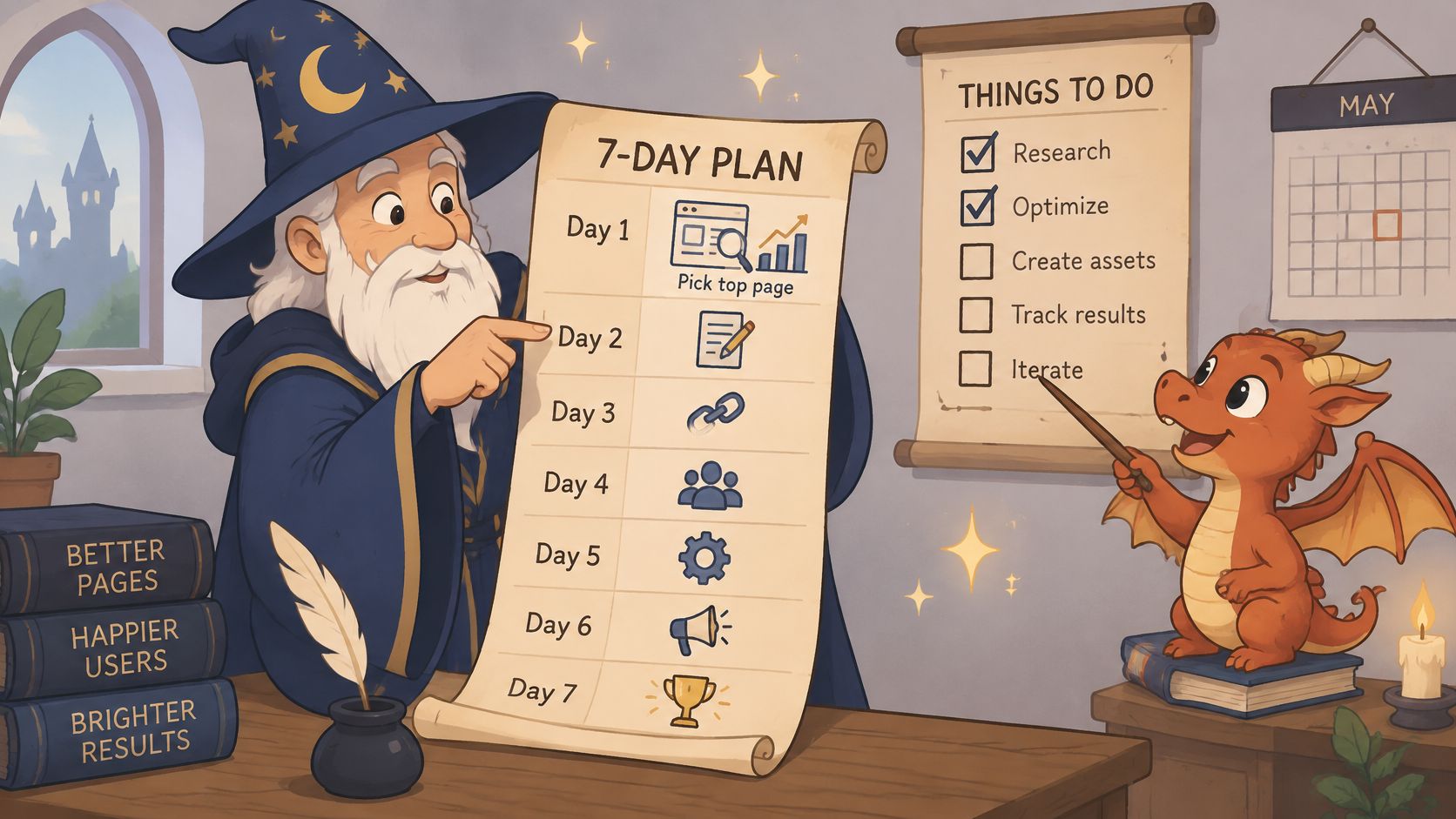
Day 1, pick the target and write the brief. Choose the page that already earns the most organic impressions and conversions. On one page, record the target query, the primary conversion goal, the offer, the audience, the price range and the single call to action.
Days 2 and 3, score it twice. Run the seven-row scorecard on a phone, then on desktop. Log every failure with the row name and the URL, and resist fixing anything yet. Diagnosis first, spellwork second.
Days 4 and 5, fix the top three. Start with search intent, follow with title and H1 alignment, then confirm mobile parity. Intent comes first because a perfectly optimized title pointing at the wrong visitor just fills the page with the wrong crowd.
Day 6, check the vitals. Open the Core Web Vitals report in Search Console, note which URL groups sit at Poor, and compare them against the thresholds above. Anything failing LCP is the first repair.
Day 7, record a baseline. Log organic impressions, CTR, rankings and conversion rate for the page, split by device, then schedule one test to run for several weeks. A baseline you didn't write down is a memory, and memories flatter.
For the technical layer underneath the landing page, Google Ranker Pro's SEO audit checklist for small businesses covers the parts a single page audit skips, and our website SEO audit tool walkthrough shows how to keep the diagnostics running rather than treating them as a one-off event.
Automation helps with the chores: recurring crawls, metadata checks, broken links. Our SEO Seer familiar crawls pages nightly, rewrites meta and fixes broken links, which is exactly the sort of chore that rots between audits. It can't judge your offer, your proof or your intent, though. That part stays yours, and it's the part that pays.
Web Mage turns a plain-English description into a live page or a full funnel, with copy, images, layout and hosting included, then keeps working on it after launch. The $8 monthly plan covers unlimited pages and funnels, speed and broken-link patrols, a monthly SEO review at about 150 credits, and 500 credits every month, enough to generate a page for roughly 60 credits or build a complete five-page funnel for about 300. Start at Web Mage and let the familiars handle the nightly crawl while you rewrite the headline.