
The launch email is written. The countdown post is scheduled for 9 a.m. You hit publish, the link goes out, and the first visitor arrives. Then someone replies with a screenshot of a padlock warning, a "site can't be reached" page, or a checkout that spins forever.
That's the risk of launch day. Not the big architectural decisions you've already argued about for months, but the small unglamorous verifications that sit between a working site and a broken one. A missing analytics tag doesn't hurt until you have no data to optimize with. A dead redirect doesn't hurt until a high-intent visitor lands on a 404, and then it hurts immediately.
Treat each of the ten checks below as a spell with a measurable success condition. Some are cast before you go live, some in the hours after. Each one carries a number or a test step, so you know whether it worked. No incantation counts as complete because it felt right. It counts because you checked.
A good website launch checklist is not a document you read once and tick. It's a ritual you repeat, and after the first pass you can hand most of it to something that runs while you sleep.
Table of Contents
- 1. Charting the Path of Domain, DNS, and Subdomain Verification
- 2. The Ward of Encryption for SSL and HTTPS Verification
- 3. Swift as a Speed Sprite on Page Speed and Core Web Vitals
- 4. The Mirror Scrying Test Across Browsers and Devices
- 5. Scrying the Search Oracles for SEO Foundations and Indexing
- 6. The Map of Broken Paths for Link Integrity and Redirect Health
- 7. The Enchanted Quill for Forms, Checkout, and Funnel Flow Testing
- 8. The Oracle's Eye on Analytics, Event Tracking, and Conversion Measurement
- 9. Sealed Scrolls of Compliance for Privacy, Cookies, and Legal Pages
- 10. Hospitality for Every Creature Through Accessibility and Inclusive Design
- The 10 Launch Spells at a Glance
- Cast the Spells, Then Let the Familiars Keep Watch
1. Charting the Path of Domain, DNS, and Subdomain Verification
"Site not found" is the least magical error page ever written, and it's what visitors meet when a domain points at nothing. Before an announcement goes out, confirm the domain loads from a device that isn't yours, that the A record points at the host serving the site, and that a CNAME is set correctly when you point a subdomain at a platform. If email runs on the same domain, check MX records too, or your launch newsletter has nowhere to land.
Say a solo founder connects a newly registered domain to the subdomain their builder provisioned the night before launch, then discovers the apex and the www version both resolve but serve different content. One redirect rule fixes it in ten minutes before launch. After launch, it costs a week of confused visitors and a support inbox full of questions.
- Confirm from more than one network. A DNS lookup tool run from a single connection can return a cached answer. Check from two or three locations, including a mobile connection.
- Choose one canonical address. Pick www or the apex, redirect the other, and use the canonical form in every ad, email, and sitemap entry.
- Lower the TTL a day early. Drop the record's time to live to a few minutes well before you plan to switch, so propagation takes minutes rather than hours.
A marketing agency running several client launches keeps one DNS sheet per client and verifies every record before switching traffic to a new funnel. That habit is the difference between a quiet cutover and discovering, on a Friday, that someone overwrote a client's mail records.
2. The Ward of Encryption for SSL and HTTPS Verification
Encryption is the ward that keeps eavesdropping goblins out of the tunnel between your visitor and your server. A browser shows a visitor what happens when the ward is missing.

Most of the web is failing this one. Mozilla's HTTP Observatory has analyzed more than 6.9 million websites through 47 million scans, and the academic analysis of 3,195 globally popular websites it cites found that 55.66% received an HTTP-security grade of F. Don't assume your host's defaults cover everything.
The minimum pass: a valid certificate that covers both the apex and www, automatic renewal with a reminder before expiry, HTTP to HTTPS in a single hop, HSTS, a content security policy that matches the scripts you load, secure cookie flags, and no mixed content on checkout or thank-you pages. If you manage your own server, the HTTPS setup guide for DevOps teams covers binding the certificate and forcing the redirect at the server level.
A course creator who checks only the homepage can still ship a checkout page that pulls a payment script over plain HTTP. Load the checkout, the thank-you page, and any embedded video player, then read the browser console for mixed content warnings before you buy traffic.
- Test the whole funnel. Homepage, offer page, checkout, and confirmation. Mixed content hides on the pages you visit least.
- Verify the chain and the expiry date. An SSL checker will flag an incomplete intermediate chain, which some browsers reject outright.
- Force a single hop. A redirect that bounces HTTP to HTTPS to www to a trailing slash is three round trips your visitor pays for.
3. Swift as a Speed Sprite on Page Speed and Core Web Vitals
A sprite that dawdles is no sprite at all. Speed is measured in the field, at the 75th percentile of visits, not by one clean test run on your laptop with the cache warm.
Measure the field, not the lab
Google's own thresholds classify a page as Good when the 75th percentile of visits records an LCP of 2.5 seconds or less, an INP of 200 milliseconds or less, and a CLS of 0.1 or less, per Google's Core Web Vitals guidance. LCP measures how fast the largest visible element renders, INP measures responsiveness across a visitor's interactions, and CLS measures unexpected visual movement. A page needs improvement from 2.5 to 4 seconds on LCP, 200 to 500 milliseconds on INP, or 0.1 to 0.25 on CLS. Beyond those ranges is poor.
The web at large isn't passing. The 2025 Web Almanac performance report, built from HTTP Archive measurements collected in July 2025, found only 59% of the top 1,000 websites achieved good Core Web Vitals on desktop and 51% on mobile, dropping to 42% and 37% on mobile among the top 10,000 and top 100,000 sites. Weight explains much of it: the same project's page weight analysis puts the median home page at roughly 2.9 MB on desktop and 2.6 MB on mobile before a single tag manager loads.
The number that matters: a page is fast when three quarters of real visits clear the thresholds. One lab run proves nothing.
- Test three pages on a throttled mobile connection. Homepage, offer, checkout. Those are the three that carry revenue.
- Compress the hero image first. It's usually the LCP element, and modern formats plus correct sizing buy more than any script trick.
- Audit third-party scripts. Chat widgets, heat maps, and retargeting pixels that no longer earn their keep are pure weight.
An e-commerce startup that defers non-critical scripts and compresses product photography to the size displayed usually clears Core Web Vitals on mobile without touching its framework.
4. The Mirror Scrying Test Across Browsers and Devices
Not every visitor peers through the same crystal ball. Here's how the same page looks through three of them.
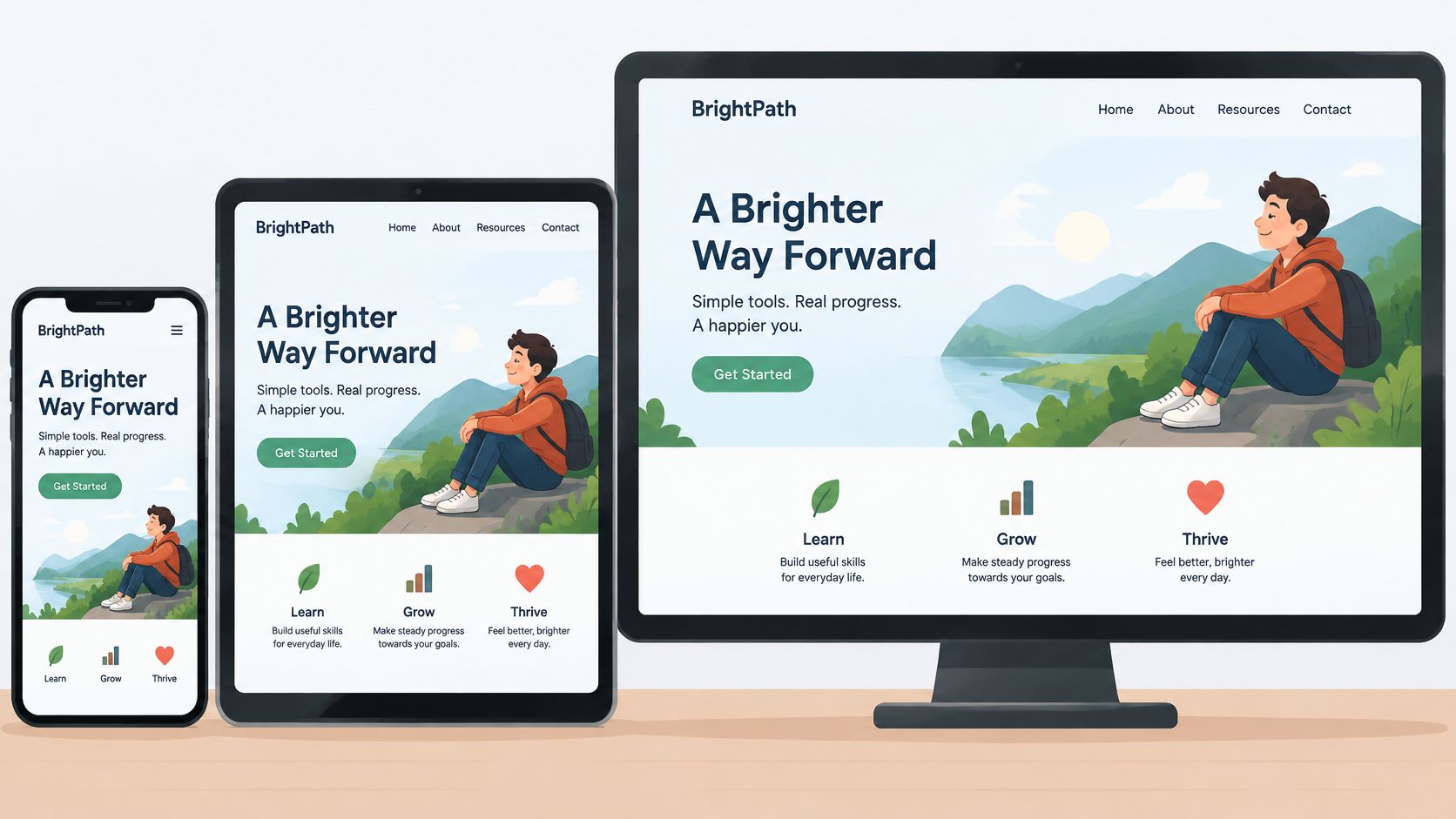
Check Chrome, Safari, Firefox, and Edge, and widths from a 320-pixel phone up to a 1440-pixel desktop and beyond. Safari is where layout bugs and date parsing issues tend to surface first, and it's a browser many teams never open during QA. The 99tests guide to browser compatibility is a useful structure for building a test matrix for the combinations your audience uses.
A SaaS growth team tests its pricing page on an older Android handset and finds the monthly and annual toggle sitting under a sticky chat bubble, untappable. The page renders perfectly in a desktop emulator, which is exactly why emulation is step one and real hardware is step two.
- Start with the top three devices in your analytics. Then expand. The long tail matters less than the phone your buyers hold.
- Use the keyboard alone. Tab through the menu, the form, and the primary call to action. If focus disappears, so will some of your visitors.
- Use emulators for breadth, real hardware for confidence. A freelancer who reviews every client build at three widths before handover catches the breakage a client would otherwise find on launch morning.
5. Scrying the Search Oracles for SEO Foundations and Indexing
Even the finest tower is useless if nobody can find the path to it. Start with the pieces a search engine reads first: unique titles, unique descriptions, a clean sitemap, a correct robots file, logical heading order, and no staging directives left switched on.
Google describes the title link as the headline shown in a search result and says it can influence whether someone clicks, per Google's guidance on titles and snippets. It also explains that a snippet may be drawn from the meta description tag, which should be a short, unique, one- or two-sentence summary of the page's most relevant points. A page titled "Home" with a description reading "Welcome to our website" is a wasted spell on every URL that carries it.
The staging noindex trap
A leftover noindex tag is the highest-stakes item on any launch checklist. A coach who builds a webinar landing page on a staging environment and forgets to remove the directive will publish a page that never appears in search, and diagnosing it takes weeks. Crawl your own site, check the response headers, and confirm the tag is gone before you announce.
- Use the site operator. Search
site:yourdomain.comto see which pages are indexed, and compare that to the sitemap. - Submit the sitemap and watch coverage. The first week of Search Console coverage reports tells you more than any audit tool.
- Write descriptions as invitations. One benefit-led sentence beats three generic ones, every time.
The mechanics of getting pages discovered, crawled, and indexed are covered in this guide to crawling and indexing in SEO.
6. The Map of Broken Paths for Link Integrity and Redirect Health
A traveler who hits a dead end should be guided back, not abandoned. Crawl the whole site before launch and again within 48 hours after. Look for broken internal links, broken external links, missing images, and redirect chains that stack three hops deep where one would do.
Three hops is a tax you pay on every visit. Point the old URL straight at the final destination.
A growth team rebuilding a site maps every old campaign URL to its new landing page with a 301 before DNS changes, because those URLs carry backlinks and paid traffic that a 404 deletes. A freelancer running a desktop crawler on a client build typically finds a dozen broken footer links that nobody clicked during the design review. Both are cheap fixes now and expensive excuses later.
- Crawl before and after. The site you tested isn't quite the site that goes live, especially if anyone edited a template at the last minute.
- Use 301 for permanent moves. Reserve 302 for temporary ones and collapse chains wherever you find them.
- Build a 404 worth landing on. A search box, links to your top sections, and a route home turns a dead end into a detour.
The workflow for finding and repairing these paths is set out in this guide on how to fix broken links.
7. The Enchanted Quill for Forms, Checkout, and Funnel Flow Testing
Every funnel is a chain of spells, and one broken link unravels the whole enchantment. Walk the entire path as a stranger would, with a test card and a throwaway email address.
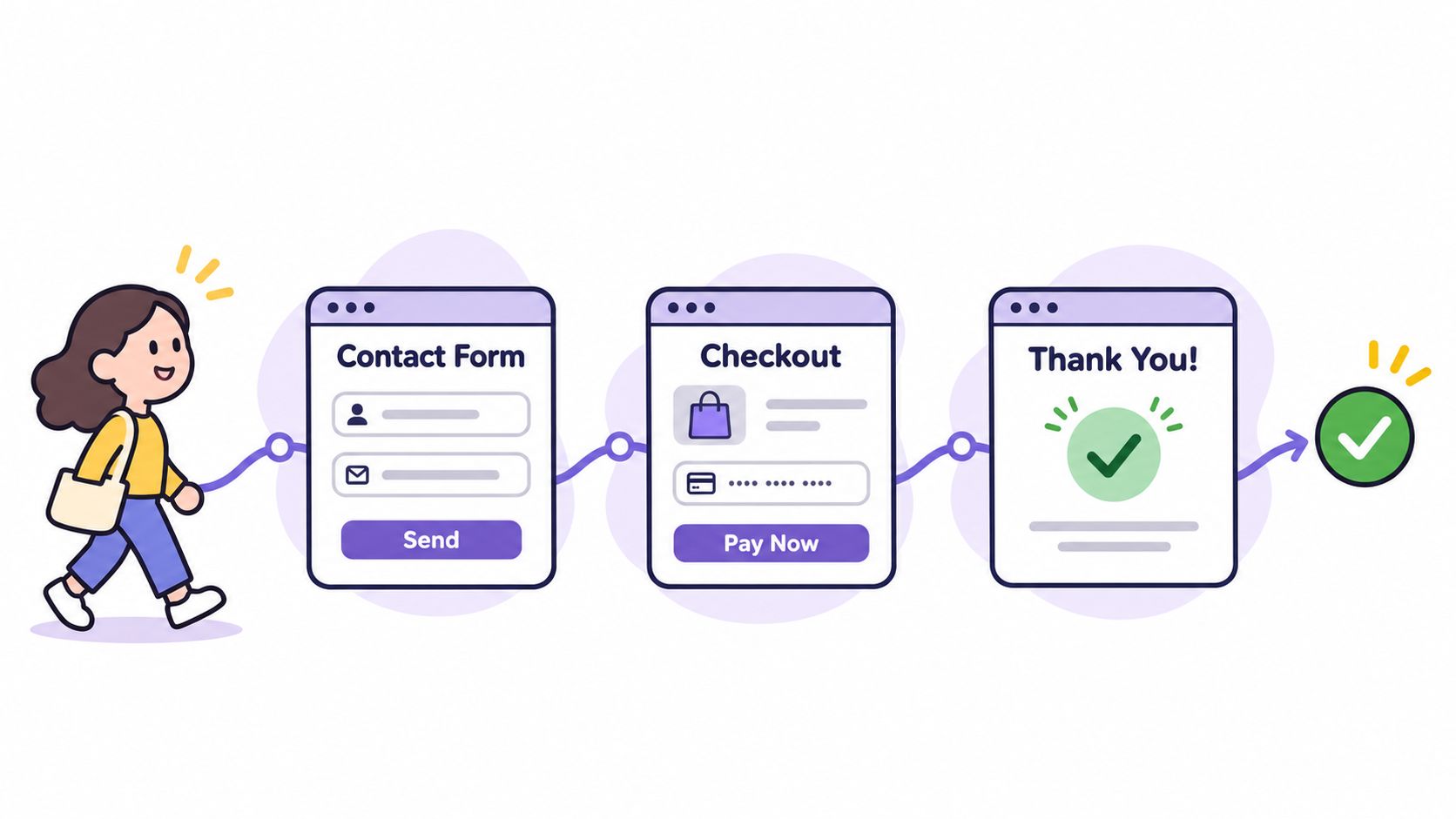
Walk the decline path, not just the happy path
A course creator places a test order, declines the upsell, and confirms that the thank-you page loads and the welcome email arrives within a minute. That last step is the one teams skip, and it's where failed integrations hide. A direct-to-consumer brand finds a coupon field that fails on mobile Safari and fixes it before the ad campaign starts, rather than watching a discount offer convert nothing.
Checkout is where the money is, so it deserves the hardest stare. The checkout usability research guide from UXIA covers the friction points worth testing beyond simple function, and this walkthrough of secure checkout covers the trust signals that belong on the payment step itself.
- Write a test script. Every step, every input, every expected result. Then hand it to someone who didn't build the page.
- Test failure states. Declined cards, invalid postcodes, empty required fields, and expired coupons tell you more than a successful order.
- Check the inbox and the spam folder. Transactional email that lands in spam is a silent conversion leak.
8. The Oracle's Eye on Analytics, Event Tracking, and Conversion Measurement
What is unmeasured is only guessed at, and guessing is not a strategy. Before launch, test representative mobile and desktop URLs in Search Console or PageSpeed Insights, then repeat those tests after analytics, consent management, chat widgets, checkout scripts, and third-party fonts are live. A page that passed in a clean preview regularly fails once everything else loads, as Google's guidance on assessing real-user experience makes clear. Measure field data after launch by URL group, not by sitewide average.
Define the thresholds before traffic arrives
The first 72 hours, according to the first-72-hours launch guidance from Kleap, are when broken redirects, tracking failures, and performance bottlenecks surface only under production conditions. That's also when analytics events need validating in the live environment, including event names and parameters, because a missing parameter breaks segmentation. Set alert thresholds and named owners for uptime, Core Web Vitals, 404s, indexation, consent rates, form delivery, funnel-step conversion, and qualified leads.
A SaaS team verifies that its trial signup event fires once per submission and not twice, which is the difference between a clean conversion rate and a report that flatters the whole quarter. A coach checks that webinar registrations attribute to the correct campaign source before spending on ads.
- Use real-time reports and a debug tool. Send one real event, then watch it land.
- Document every event name. Future you will not remember why
lead_v2_finalexists. - Exclude internal traffic. Your own launch testing shouldn't pollute the baseline you'll measure against.
9. Sealed Scrolls of Compliance for Privacy, Cookies, and Legal Pages
Even the mightiest mage must respect the laws of the realm, and those laws have paperwork attached. Confirm a privacy policy, terms of service, and, where you sell, a refund policy. Then check that what the policies promise matches what the site does with data.
Audit consent, not just the banner
A cookie banner that appears is not a cookie banner that works. Test which scripts load before consent and which load after. In regions governed by the EU's GDPR, non-essential cookies need consent before they fire, and retargeting pixels are squarely in that category. A DTC startup that adds a new email tool and forgets to update its privacy policy has created a mismatch that's easy to fix now and awkward to explain later.
An agency running European campaigns adds consent management to a client site before switching on retargeting, because the pixel has to wait for the banner, not the other way round.
- List every tool that collects personal data. Email platform, analytics, chat, payment processor, ad pixels. Each one belongs in the policy.
- Test the decline path. Clicking "reject all" should prevent the scripts from loading.
- Get a professional review for your jurisdiction. Requirements vary by country and industry, and this is not legal advice.
10. Hospitality for Every Creature Through Accessibility and Inclusive Design
A shopper tabs to the buy button, hears nothing useful from a screen reader, and leaves. That failed path is the hospitality spell. Before launch, every primary page has to be perceivable, operable, and understandable at a level you can test.
The gap is wide. A scan of the top one million home pages found WCAG violations on 95.9% of them, averaging 56.1 detected errors per page, according to web accessibility statistics compiled by Quashbugs. US website-accessibility lawsuits keep rising, so a weak launch is legal exposure as well as a lost sale.
WCAG 2.2 organizes requirements under four principles: perceivable, operable, understandable, and compatible with assistive technology. It defines testable success criteria at Levels A, AA, and AAA. Level A is the floor. Level AA requires every A criterion plus the AA set. AAA adds the strictest set. WCAG 2.2 also sets a flashing limit: no more than three flashes in any one-second period unless the content stays below the general-flash and red-flash thresholds.
Pick the conformance level before you test. I recommend AA as the launch target.
A freelancer who fixes unlabeled form fields for a client often sees abandoned submissions drop, because a label helps every visitor, not only one using a screen reader. An e-commerce team that writes descriptive alt text on product images improves product discoverability at the same time.
Automated tools catch part of the problem. A keyboard pass catches what a scan misses: focus order, visible focus, and controls with no accessible name. After launch, rerun the scan when you ship a new page or component. A recurring crawl can flag fresh violations. It cannot tell you whether a screen reader announces the signup flow in a sensible order. That check stays manual.
- Scan first, then use the keyboard. Tab the homepage and the signup flow without a mouse. Focus must stay visible, and every control needs a name.
- Check contrast on buttons, banners, and small print. Those are where low-contrast text hides.
- Run one key page through a screen reader. The homepage plus the signup flow is a reasonable sample.
The 10 Launch Spells at a Glance
| Item | Launch Phase | Key Target | Difficulty |
|---|---|---|---|
| Charting the Path: Domain, DNS, and Subdomain Verification | Pre-launch setup | Correct domain resolution and DNS records | Moderate |
| The Ward of Encryption: SSL and HTTPS Verification | Pre-launch security check | Valid SSL and HTTPS across all pages | Easy |
| Swift as a Speed Sprite: Page Speed and Core Web Vitals | Pre-launch performance check | Fast loading and strong Core Web Vitals | Moderate |
| The Mirror Scrying Test: Cross-Browser and Device Responsiveness | Pre-launch compatibility check | Functional layouts across browsers and devices | Moderate |
| Scrying the Search Oracles: SEO Foundations and Indexing | Pre-launch SEO setup | Search-ready metadata, sitemap, and indexing | Moderate |
| The Map of Broken Paths: Link Integrity and Redirect Health | Pre-launch quality check | Working links and clean redirects | Easy |
| The Enchanted Quill: Forms, Checkout, and Funnel Flow Testing | Pre-launch conversion testing | End-to-end forms, checkout, and email flows | Moderate |
| The Oracle's Eye: Analytics, Event Tracking, and Conversion Measurement | Pre-launch measurement setup | Accurate analytics and conversion events | Moderate |
| Sealed Scrolls of Compliance: Privacy, Cookies, and Legal Pages | Pre-launch compliance check | Accurate legal pages and consent behavior | Complex |
| Hospitality for Every Creature: Accessibility and Inclusive Design | Pre-launch accessibility check | Inclusive access and WCAG-aligned usability | Complex |
Cast the Spells, Then Let the Familiars Keep Watch
Run all ten checks in order and launch stops feeling like a gamble. It becomes a completed ritual, with the tower standing, the wards lit, and the path swept.
The hard part isn't launch day. It's the thirty days after, when metadata drifts, a link rots because someone renamed a page, a hero image doubles in size, and a split test that should have been retired two weeks ago is still splitting traffic. That recurring work is exactly what Web Mage exists to absorb. Every site it generates comes with four built-in AI agents called familiars that run automatically every 24 hours, no setup required.
The SEO Seer crawls pages nightly, rewrites meta, and fixes broken links. The Speed Sprite compresses images and keeps an eye on page speed. The Analytics Oracle reads site analytics and surfaces the visitors who stall or abandon. The Conversion Alchemist creates, runs, and promotes A/B split tests, promoting a challenger when it reaches significance instead of waiting for a human to remember to check. One $8 monthly plan includes hosting, SSL, a custom subdomain, and 500 credits, and building a complete 5-page funnel costs about 300 credits. You can cancel at any time.
The pattern worth stealing, whatever you build on, is the split between one-time verification and continuous patrol. Ten spells cast once protect your launch weekend. A checklist you keep running protects the year.
If you'd rather learn the trade than the tool, keep the manual version: a spreadsheet with a column for the check, a column for the evidence, and a column for who owns the fix. It won't self-heal, but it will tell you precisely what broke and when.
Web Mage turns a plain-English description into a full site or funnel, then keeps the checks above running on a daily cycle: nightly metadata and broken-link patrols, continuous image compression and speed monitoring, analytics readings that flag where visitors stall, and split tests that promote a winner once it's significant. One $8 monthly plan covers hosting, SSL, a custom subdomain, and 500 credits, with a 5-page funnel costing about 300 credits. Visit Web Mage and go live with the spells already cast.