64% of surveyed U.S. consumers named payment data being compromised in a breach as their greatest payments concern, according to NMI's 2025 consumer payments survey. A secure check out has to protect the card details and give buyers enough confidence to finish. A dragon at the vault door won't help if the merchant hides the final price until the customer reaches the treasure chest.
Table of Contents
- Secure Check Out Basics and the Checklist at a Glance
- Picking a Payment Setup That Shrinks Your PCI Scope
- How to Lock Down the Connection and Card Data
- Adding Fraud Checks Without Punishing Good Buyers
- Trust Signals That Help and the Ones That Backfire
- Monitoring Checkout and Your First Staging Run
Secure Check Out Basics and the Checklist at a Glance
Secure checkout controls and how to verify each
| Control | What It Protects | Pass Test |
|---|---|---|
| HTTPS with TLS 1.2 or higher on every checkout request | Card data in transit | Certificate is valid and no HTTP fallback exists |
| Hostname-matched certificate | Interception on a lookalike server | Certificate name or wildcard covers the exact checkout host |
| Hosted fields or tokenization | Raw card numbers in your systems | Card number never appears in your logs, database or error tracker |
| Strong customer authentication (3-D Secure) | Unauthorized card use | Risk-based challenges work, including any required authentication |
| Signed webhooks | Forged payment confirmations | Unsigned or wrong-signature test requests are rejected |
| Least-privilege admin access with MFA | Takeover of store admin accounts | Staff roles are limited and every admin login requires MFA |
| Full total shown before the payment step | Surprise-cost abandonment | Shipping, tax and fees are visible before the card form |
| Guest checkout and familiar payment methods | Drop-off and buyer doubt | Guest path completes and at least one wallet plus card is offered |
| Authenticated vulnerability scan | Unpatched checkout code | Scan passes before launch and after each major change |
Treat the table as a launch gate, not a collection of decorative spells. Walk every row on staging, your nonproduction checkout, using a real phone and your payment provider's test cards. Give each failure an owner and block launch until it's fixed and retested.
Start with the controls that contain exposure
When time is tight, prioritize the connection and card-data rows, then access and payment confirmation. A padlock doesn't fix a debug log that prints card numbers, and a reassuring checkout design doesn't compensate for unrestricted administrator access.
Use this visual checklist alongside the detailed pass tests:
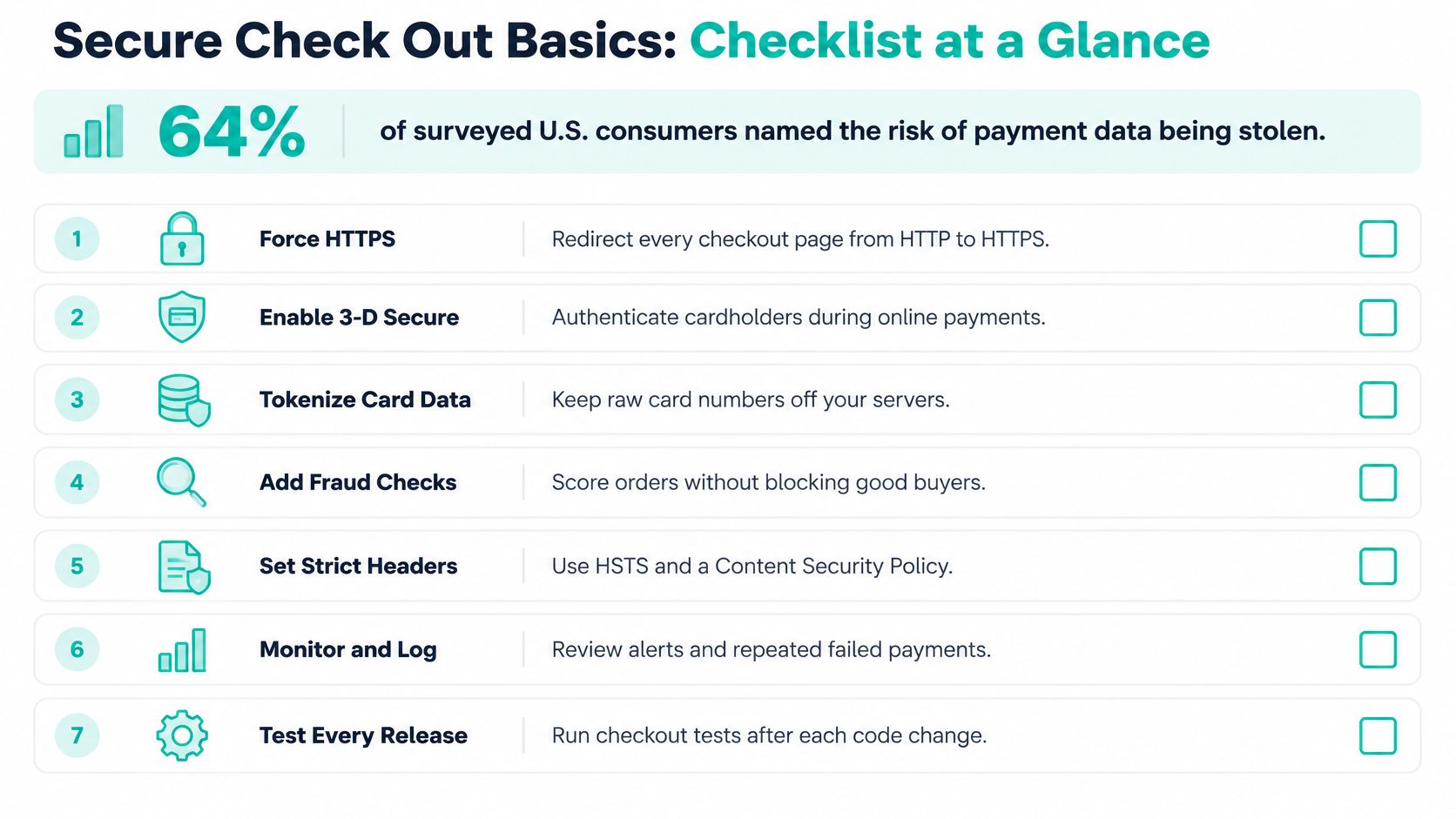
For the buyer-facing work, pair the controls with this checkout page optimization guide. Copy the table into your launch checklist and assign a named owner to every row. “The team handles that” is how an unguarded side entrance survives inspection.
Picking a Payment Setup That Shrinks Your PCI Scope
Choose where card entry happens before choosing how elaborate your checkout should look. A course seller using a payment link has a different security job from a platform operating its own card-data infrastructure.
Merchants accepting payment cards must comply with PCI DSS, the Payment Card Industry Data Security Standard. Validation depends partly on integration method and card-transaction volume: merchants fall into four levels measured over a rolling 12-month period, with Level 1 facing stricter requirements, according to Checkout.com's PCI compliance documentation.
Annual validation often involves a Self-Assessment Questionnaire, or SAQ. Think of it as the inspection paperwork for your particular vault, not a universal form that every merchant completes identically.
Payment setups compared by PCI questionnaire and scope
| Payment Setup | SAQ Type | Scope You Carry | Typical Fit |
|---|---|---|---|
| Hosted payment page or payment link | SAQ A, subject to eligibility | Smallest; provider handles card entry | Courses, digital downloads, small catalogs |
| Embedded provider fields on your own page | SAQ A-EP for some integrations; confirm eligibility | Medium; your page's scripts can affect card security | Custom-designed stores and funnels |
| Direct card API on your own servers | SAQ D | Full; you store, process or transmit card data | Large platforms with in-house payments teams |
Use the integration details, not the label
Embedded doesn't automatically mean SAQ A-EP. Provider-hosted fields and merchant-controlled payment forms aren't interchangeable. Ask your provider and acquiring bank, the bank handling your card acceptance, to confirm the questionnaire for the exact implementation.
A hosted payment page is worth considering when your requirements don't justify direct card handling. A custom API gives engineers more control, but it also gives them more systems, access paths and failure modes to defend.
Review every proposed payment-page script, including upsell widgets, chat tools and conversion pixels. Ask whether it changes the security scope before installing it, rather than discovering the answer during validation.
Practical rule: Outsource card entry when you can, but don't mistake reduced scope for transferred responsibility.
Write down your annual card-transaction count and integration method before choosing a provider. Then confirm the matching questionnaire and eligibility conditions in writing.
How to Lock Down the Connection and Card Data
Start with the route into the vault, then examine where sensitive information can escape. TLS protects the connection through encryption, authentication and integrity; Google's payment transport-security documentation specifies TLS 1.2 or higher and certificate hostname checking for its payment API endpoints.
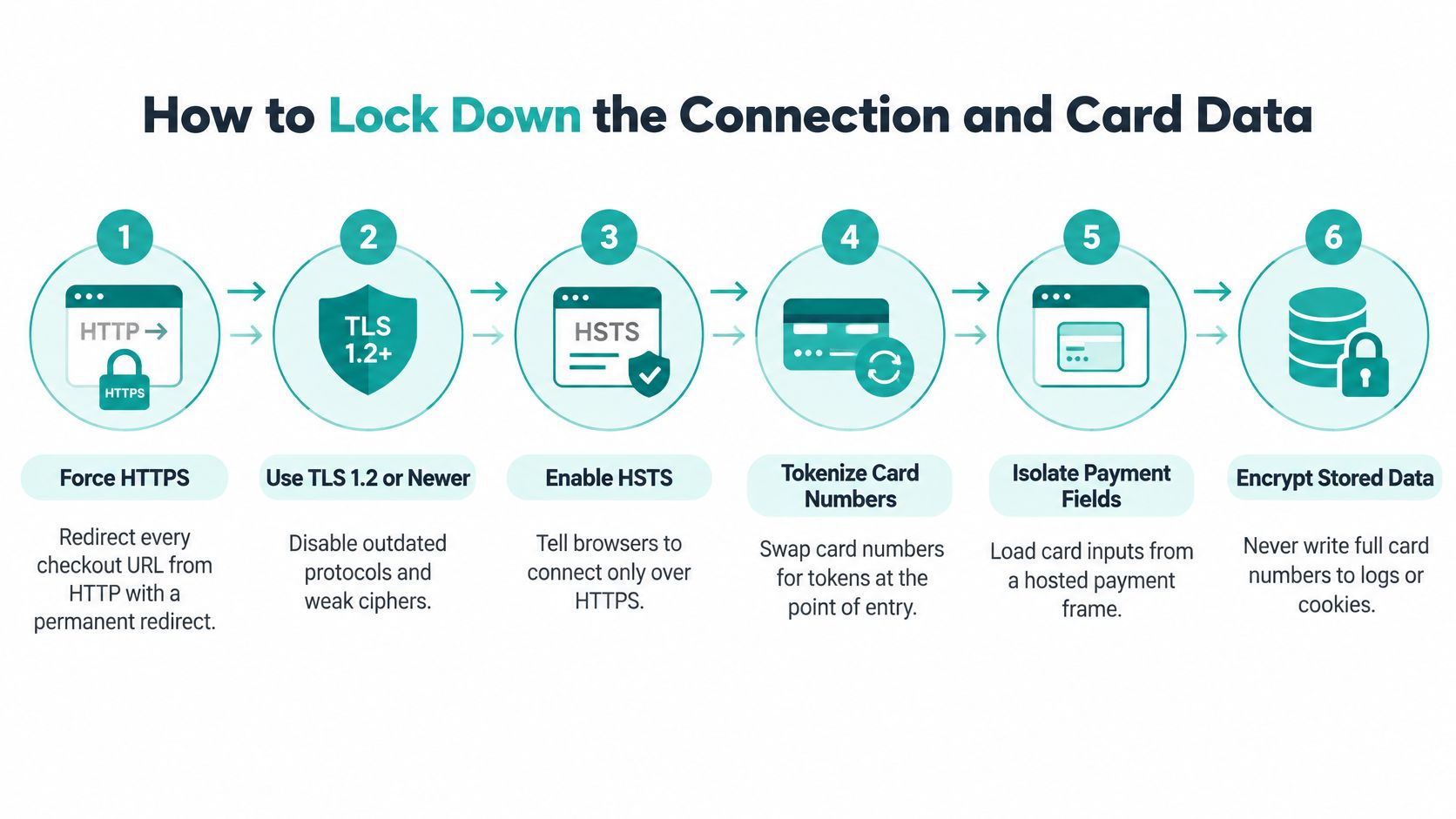
Use this visual as a reminder, then verify the actual behavior rather than assuming the infrastructure settings are correct:
Secure the route and isolate the payload
Force HTTPS throughout checkout. Permanently redirect HTTP checkout URLs to HTTPS and inspect the page for insecure scripts or images. Check the whole payment journey, including return pages; the mistake to catch is protecting the card form while leaving a supporting request unprotected.
Verify the negotiated TLS version. Check payment endpoints, servers and load balancers, then disable outdated protocols wherever your infrastructure terminates encrypted traffic. Don't assume changing the application server also changed the public-facing load balancer.
Check the exact hostname. Confirm that the certificate name or wildcard covers the checkout host and that the certificate is valid. Never tell a buyer to bypass a certificate warning because the store “still works.”
Keep card capture with the provider. Use the hosted-field or token approach confirmed during your scope decision; a token substitutes for the card number. The implementation mistake is sending the raw number through your backend before exchanging it.
Inspect every recording surface. Search server logs, browser diagnostics, analytics and error trackers for test-card values and suspicious numeric patterns, including 16-digit sequences without assuming all cards share that length. Watch for tag-manager or analytics code that reads payment-form fields.
Verify payment messages and retry behavior
Test webhook authenticity and duplicate handling. A webhook is the provider's server-to-server payment notification: send an unsigned request, an incorrect-signature request and a replayed valid event. Reject invalid signatures, and ensure a duplicate event can't repeat fulfillment; the mistake is treating signature validation alone as replay protection.
Make retries idempotent. Give the order a unique key and use the provider's supported retry mechanism so repeated requests can't create duplicate purchases. Force a timeout, resubmit the payment and confirm only one order exists; don't generate a fresh key for every click.
These operational checks follow the layered approach described in Visa's payment-experience guidance. The aim is to test boundaries, not merely collect reassuring configuration screenshots.
Keep a dated screenshot of the valid certificate, evidence of the negative webhook tests and a log search returning no exposed test-card values. A clean search is useful evidence, not proof that every possible leak has been excluded.
For a supplementary walkthrough, use the video alongside your provider-specific documentation:
Adding Fraud Checks Without Punishing Good Buyers
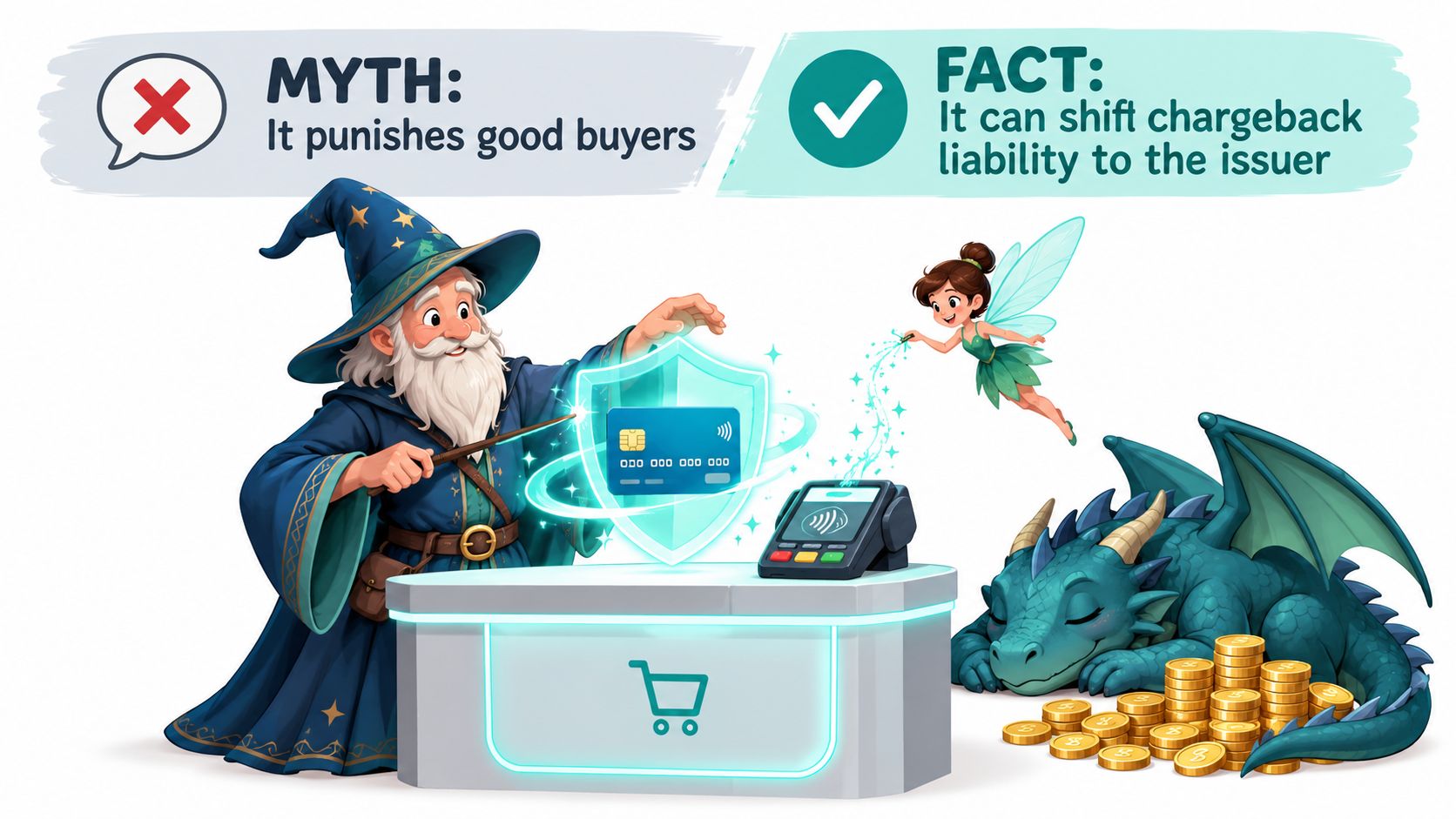
3-D Secure doesn't make fraud impossible. EMV 3-D Secure can authenticate an online cardholder and, in many cases, shift liability for a later fraudulent chargeback to the issuer, but successful authentication doesn't necessarily guarantee authorization or liability shift. Exemptions and the parties handling the payment affect the outcome, as Trust Payments explains in its liability guidance.
It's a gatekeeper asking for a magical seal, not an invincibility spell. The issuer can still decline the payment after the customer authenticates.
Match the intervention to the risk
Use these tiers as a starting policy, then adjust them to your provider, customers and applicable authentication requirements:
- Low risk: A returning customer, familiar device and expected purchase amount may justify a low-friction path when permitted. The trade-off is accepting residual risk rather than making every familiar buyer prove themselves again.
- Medium risk: A new card combined with an unfamiliar country or unusual order size deserves closer inspection. Use a provider-supported challenge, such as banking-app approval or a one-time code, but recognize that interruption can cost a legitimate sale.
- High risk: Repeated declines, rapid bursts of attempts or conflicting order details can justify manual review or refusal. Evaluate the signals together; a billing-and-shipping mismatch alone isn't a verdict.
Authorization means the issuer approves the payment. Authentication checks identity. Keep those outcomes separate in reporting so a completed identity challenge doesn't conceal a payment that still failed.
A strict rule isn't automatically a good rule. Ask which legitimate customers it turns away.
Rules tuned to domestic buyers can obstruct international customers whose addresses, payment habits or purchase patterns differ. Inspect rejected orders by market before tightening a broad geographic rule.
That is the point where conversion-focused UX work belongs beside fraud review. Clear challenge instructions and a recoverable failure path matter as much as the decision to request verification.
Configure the tiers in your provider dashboard, then review challenge and decline rates weekly during the first month. Read the underlying failures before changing the rules, and don't suppress authentication that your provider or applicable requirements demand.
Trust Signals That Help and the Ones That Backfire
More badges and more prompts won't repair a checkout that reveals shipping, tax or subscription terms late. Buyers already arrive watchful: 97% of surveyed consumers across 17 Central and Eastern Europe, Middle East and Africa markets reported taking digital-payment precautions in Visa and Wakefield Research's 2025 survey.
Signals that help
- An understandable total: Present the full amount before card entry, with recurring-payment terms made explicit.
- Recognizable payment identity: Identify the provider accurately so buyers understand who handles the payment.
- Visible recourse: Make refund terms and a working support route easy to find.
- A reason for sensitive fields: Explain why you need information such as a phone number. Remove fields you can't justify.
Signals that backfire
- Unverified badge collections: Don't display seals you aren't entitled to use.
- Mandatory registration: Let buyers purchase without turning the transaction into an account-creation project.
- Blanket verification: Avoid unnecessary challenges regardless of transaction context.
- An unfamiliar card form: Don't redesign familiar payment interactions just to make them look more “magical.”
The commercial stakes aren't hypothetical: Baymard's aggregated cart-abandonment benchmark reports 70.22% across 50 published studies. That's context, not your store's forecast, and abandonment has causes beyond security.
Mobile testing must go beyond checking whether the layout fits. Follow inclusive checkout-testing considerations by checking autofill, thumb-sized controls and the return journey after banking-app approval.
Complete a purchase on a mid-range Android phone using one hand and note every hesitation. Then test keyboard navigation, screen-reader labels on card and code inputs, and recovery after a decline. Preserve non-sensitive entries, but let the provider determine which payment fields can safely persist.
Monitoring Checkout and Your First Staging Run
Record checkout_start, address_validated, payment_attempt, authentication_challenge, payment_success, error_code and abandonment_reason. Only record an abandonment reason when you have an actual signal or voluntary answer; don't label an unexplained exit as distrust.
Segment results by device, country, payment method and new versus returning buyers. Use completed paid orders per checkout start as the primary experiment metric, following the funnel approach supported by Baymard's checkout-usability research, while keeping fraud, support and reliability visible.
Write the guardrails before testing
The thresholds below are proposed operating rules, not industry benchmarks. Adapt them to your baseline, order volume and risk tolerance before starting an experiment.
Post-launch guardrails and what each signal means
| Guardrail | Healthy Signal | Red Flag |
|---|---|---|
| Authorization rate | Holds steady within 1 percentage point of baseline | Drops 3 or more percentage points after a rule or gateway change |
| Fraud rate | Flat or falling as order volume grows | Rises at the same time as conversion |
| Chargebacks | Stable month over month | Two consecutive weekly increases |
| Payment-related support contacts | Flat after each release | Rises within a week of a release |
| Checkout latency to payment form | Under 2 seconds on mobile | Slower after a new script is added |
| Completed paid orders per checkout start | Rises or holds steady | Rises only during a short spike |
Check these weekly for the first two months after pricing, fraud-rule, gateway or payment-page-script changes. If an automated experiment promotes winners, make the guardrails prerequisites rather than optional dashboard decorations.
Release gate: Higher conversion doesn't count as success when the merchant also accepts more fraud or creates more payment failures.
Book the staging run
Start with the opening checklist's card-data handling, administrator access and prepayment-total rows. Use provider test cards, a real phone and a deliberately slow connection, then fix and retest every failure before release.
Keep these checks in the monthly maintenance schedule. For slow-loading paths, use this website speed optimization guide to investigate the page rather than relaxing the latency target.
For tooling, consider an AI-driven website and funnel builder alongside a conventional storefront or custom application. Page generation and managed hosting can reduce upkeep, but they don't decide your PCI scope, choose a suitable provider or verify card-data handling.
Write your guardrail thresholds down before the next test starts, name the person authorized to stop it, and book the first staging run for this week.
Web Mage generates connected checkout and funnel pages from plain-language prompts, includes hosting and SSL in a monthly plan, and runs nightly agents for SEO, speed and analytics. Visit Web Mage to build your purchase flow, then use this checklist to test the payment integration before opening the vault to customers.