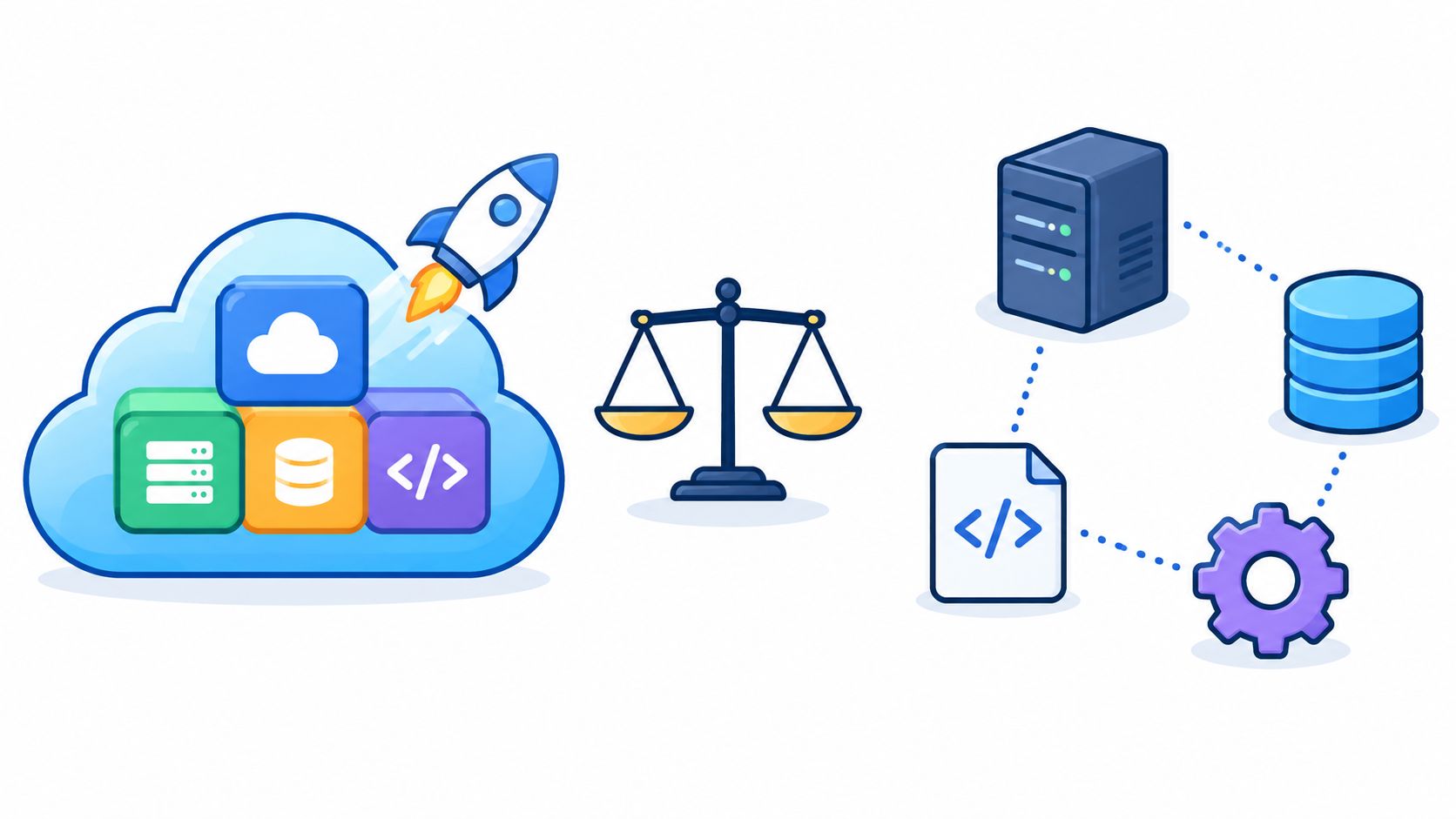
Most advice about website hosting and builder platforms is too shallow. It treats the choice like a shopping cart problem. Compare features, compare sticker price, pick the tool with the nicest dashboard, move on.
That's how founders end up cursed by their own convenience.
The decision isn't bundled versus separate. It's who carries the operational burden after launch. If your platform acts like a helpful wizard on day one but turns into an opaque sorcerer by month twelve, you didn't buy simplicity. You rented mystery.
The market itself tells you this category is no side quest. The global web hosting market is projected at USD 182.28 billion in 2026, up from USD 180.35 billion in 2025, and forecast to reach USD 300.21 billion by 2031 at a 10.49% CAGR, according to DiviFlash's summary of web hosting statistics. Website builders have followed the same arc, with more recent industry summaries placing that market at about $3.57 billion in 2026 and projecting $7.67 billion by 2031 at a 16.58% CAGR, as compiled in Hostinger's website builder market roundup. This isn't a toy category anymore. It's infrastructure.
Founders still get seduced by the fairy dust version of the pitch: one bill, one login, one support team. Nice idea. Sometimes true. Often expensive in ways that don't show up until your site matters.
Table of Contents
- The Bundled Hosting and Builder Trap Most Founders Walk Into
- What a Bundled Platform Actually Includes
- Bundled Versus Separate Stack at a Glance
- The Real Cost of Each Model and Where the Bills Hide
- Who Wins in the Wild by Use Case
- Reading a Managed Plan Without Getting Spellbound
- Which Model Should You Cast and When
The Bundled Hosting and Builder Trap Most Founders Walk Into
The trap is simple. Founders hear “all in one” and translate it to “less risk.”
Wrong translation.
A bundled website hosting and builder setup usually does reduce launch friction. You can get a domain connected, SSL working, pages live, and forms collecting leads without assembling a Frankenstack in public. That part is real. The trouble starts when founders assume fast to launch also means easy to own.
Simpler to buy is not simpler to operate
Bundled platforms hide a lot of machinery. That's the point. Caching gets handled for you. Images get compressed. Scripts get deferred. Security patches happen in the background. Sometimes the platform decides what should load, when, and how.
That can be fine until something breaks in a way you can't inspect.
A split stack surfaces problems faster because each layer has clear seams. Hosting is hosting. The CMS is the CMS. Analytics are analytics. If performance degrades, you can usually trace where the gremlin lives. In a bundled stack, the dragon is behind the curtain. You often don't know whether the issue comes from your content, the platform optimizer, a hidden plan limit, or a support policy designed to protect the vendor's margins.
Practical rule: If you can't tell what the platform is changing on your behalf, you can't price the long-term cost of that convenience.
Think in three time horizons
Most founders only budget for launch. That's rookie magic.
Use this lens instead:
- Launch horizon: How fast can your team publish something credible?
- Growth horizon: What happens when the site becomes part of sales, hiring, SEO, and paid acquisition?
- Exit horizon: How ugly is migration when you outgrow the platform, rebrand, or sell the company?
The model that wins at launch often loses at exit. Proprietary layouts, partial exports, locked design systems, and closed app ecosystems don't hurt when the site is six pages. They hurt when the site is your revenue engine.
The hidden shift in responsibility
Hosting providers themselves are telling you where the market is moving. In a 2026 hosting trends report, 50% said they plan to add professional services like site builds and security remediation, while 53% said AI-driven automation and products will have the biggest impact in 2026, according to WebPros' hosting trends report. Read that carefully. Vendors aren't just selling boxes anymore. They're selling intervention.
That means your platform may reduce technical chores while increasing dependence on the house mage.
What a Bundled Platform Actually Includes
Let's stop using fuzzy language.
A bundled platform combines website hosting and builder functions into one product. A separate stack splits those layers across different vendors and tools. If you don't define the ingredients, every comparison turns into goblin fog.
Feature Inclusion by Model
| Capability | Bundled Platform | Separate Stack |
|---|---|---|
| Domain connection | Usually built in or guided | Usually connected manually between providers |
| DNS management | Often inside the same dashboard | Often handled at registrar or host level |
| SSL certificate | Usually included | Often included, but setup and renewal rules vary |
| Hosting infrastructure | Included | Purchased separately |
| Visual builder | Included | Added through CMS, theme, or builder tool |
| Templates | Included | Depends on builder or theme ecosystem |
| Forms | Usually included | Often provided by plugin, app, or third-party tool |
| CDN or caching | Sometimes included by default | Depends on host and configuration |
| Email tools | Sometimes bundled, often tiered | Usually separate |
| Root server access | Rare | Often available depending on host |
| Custom server-side code | Limited or blocked | Usually possible |
| Plugin extensibility | Limited to approved apps | Broad, especially on WordPress or custom stacks |
| Staging environment | Sometimes premium-only | Often available on managed hosts |
| Portable open backups | Often limited | Usually easier to control |
What bundled usually means in practice
Think Wix, Squarespace, Hostinger Website Builder, GoCentral, or Shopline. You get the castle walls, the editor, the SSL spell, and a support desk in one panel. For small teams, that's attractive because there are fewer moving parts.
But bundled doesn't mean unlimited. It often does not include:
- Root-level control: You probably can't install whatever you want on the server.
- Open export formats: Content may leave, but design and structure often won't.
- Server-side freedom: Custom backend logic is usually constrained.
- Deep staging workflows: Some platforms offer previews, but not full development discipline.
If you're exploring a more guided no-code path, this breakdown pairs well with Web Mage's take on the no-code website builder landscape.
What a separate stack actually looks like
A separate stack means you pick the host and the building layer independently. That might be Kinsta plus WordPress, Cloudways plus WordPress, SiteGround plus a page builder, DigitalOcean plus a custom React front end, or Webflow plus external tools for forms, automation, and analytics.
You gain visibility and flexibility. You also inherit more decisions.
Bundled platforms are closed gardens. Separate stacks expose the plumbing. Whether that feels liberating or exhausting depends on your team.
The biggest mistake I see is founders buying a bundled platform while assuming they're also buying future flexibility. They usually aren't. They're buying a polished starter wand, not the whole spellbook.
Bundled Versus Separate Stack at a Glance
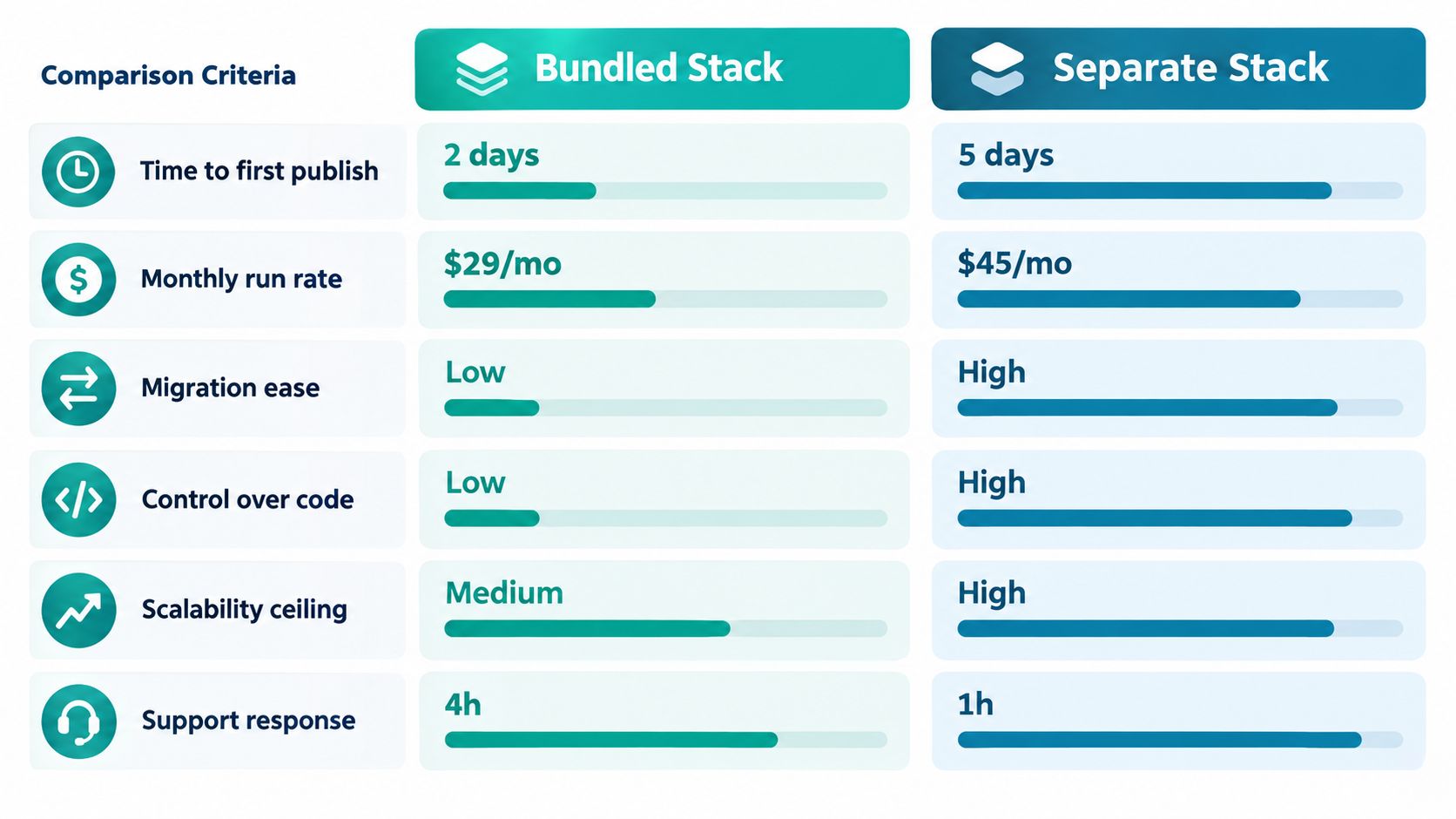
Founders usually frame this as a feature choice. It is a cost-of-ownership choice.
A bundled platform buys speed by hiding labor inside the platform. A separate stack exposes the labor, but it also gives you a chance to control it, price it, and replace it. That difference matters more than any template library or plugin count.
Six dimensions that matter
| Dimension | Bundled stack verdict | Separate stack verdict |
|---|---|---|
| Time to first publish | Fastest path to a live site | Slower setup, more decisions up front |
| Monthly run rate | Simple invoice, hidden labor inside the platform | More line items, easier to price each component |
| Migration friction | High if design, CMS, and hosting are tightly coupled | Lower if content, front end, and hosting are modular |
| Performance ceiling | Fine for brochure sites, limited when needs get specific | Higher ceiling if someone on the team can tune the stack |
| Observability | Limited logs, limited server access, limited diagnosis | Better visibility into hosting, app behavior, and failures |
| Exit cost | Expensive when the platform owns the structure | Lower when parts can be swapped independently |
Where bundled stacks are the right call
Bundled wins when speed is the job.
A founder with a pitch deadline, a new consultancy that needs credibility next week, or a local service business that just needs leads should not spend three weeks comparing hosts, caching layers, and form plugins. Publish the site. Start learning from traffic and conversions. Let the platform handle the routine maintenance it was built to absorb.
That convenience is real. So is the catch. The platform often shifts performance tuning, image handling, plugin equivalents, and security policy into black-box systems you do not configure directly. Early on, that saves money because you are not paying a developer to babysit the stack. Later, it can turn routine fixes into support tickets, plan upgrades, or full rebuilds.
Where separate stacks earn the extra effort
Separate stacks win once the site starts carrying operational weight.
If the site feeds sales, content, hiring, SEO, partner workflows, or product education, modularity usually costs less over time. You can replace a form tool without replacing the site. You can move hosts if support drops. You can inspect logs, benchmark changes, and fix the actual bottleneck instead of waiting for a platform agent to decide what gets optimized.
That control matters because web quality decays fast when nobody can see the underlying system. A recent review cited in Big News Network's coverage of site quality and AI builders found widespread accessibility failures and growing page complexity across home pages. More automation does not remove that burden. It often relocates it into tools and defaults your team cannot audit well.
My recommendation
Choose bundled if the site is a short path to market and the business can tolerate a pricier exit later.
Choose separate if the site is going to become infrastructure.
Founders get burned when they buy bundled software expecting future flexibility, then discover the platform has been doing too much of the work in ways they cannot inspect, separate, or take with them. That is the split between these models. It is not convenience versus complexity. It is rented efficiency versus owned control.
The Real Cost of Each Model and Where the Bills Hide
Founders love headline pricing because headline pricing lies politely.
The monthly number on the pricing page is the appetizer. The bill arrives later, wearing a cloak.
Year-One vs Year-Three Cost Comparison
| Cost Component | Bundled Model | Separate Stack |
|---|---|---|
| Base platform fee | Usually simple at purchase | Usually split across host, builder, plugins, and services |
| Domain renewal | Sometimes marked up inside platform billing | Often easier to shop around |
| Email seats | Common add-on | Usually separate from day one |
| Storage or bandwidth tiers | Often hidden behind plan jumps | Depends on host terms and traffic profile |
| Backup access | May be limited by tier | Often included by host or purchased separately |
| Staging site | Sometimes premium-only | Common on better managed hosts |
| Plugin or app fees | Limited app marketplace, but premium tools add up | Broader plugin costs, more freedom, more sprawl |
| Optimization tooling | Sometimes bundled, sometimes credit-based | Often separate tools or manual labor |
| Migration cost later | High if export is partial | Lower if stack is modular |
| Maintenance labor | Lower early, opaque later | Higher ongoing, but easier to scope |
Bundled bills hide in convenience layers
Bundled plans commonly look clean because they roll several basics into one fee. Then the meter starts ticking on things founders assumed were included forever.
Watch for these traps:
- Email upsells: The site plan is cheap. The business inbox isn't.
- Plan gating: Better forms, more admins, advanced analytics, or commerce features sit one tier up.
- Marketplace fees: Templates, sections, premium apps, and integrations turn the “simple” stack into a tab collection.
- Opaque optimization credits: AI image cleanup, SEO tweaks, or traffic allocation may exist, but not all usage is covered equally.
- Renewal pain: Promo rates expire. Your annual bill grows while your position weakens.
If performance is central to your buying decision, this companion read on how to optimize website speed helps you separate cosmetic promises from infrastructure reality.
Separate stacks hide bills in labor
Split stacks rarely surprise you with platform lock-in fees up front. They surprise you with maintenance hours.
That usually means:
- Plugin licensing: Security, forms, schema, backups, redirects, memberships, and SEO can each become a subscription.
- Developer cleanup: Updates break things. Theme conflicts appear. Someone has to patch the castle wall at inconvenient times.
- Environment overhead: Staging, backup retention, and monitoring often cost more than founders plan for.
- Tool spread: The “best of breed” stack can devolve into a hydra. Cut one head off, two integration issues appear.
The cheapest stack is the one your team can maintain without panic, not the one with the lowest sticker price.
The total cost question founders skip
Here's the framing I use in client work: what costs more, software or uncertainty?
Bundled stacks reduce uncertainty at launch and increase it later. Separate stacks do the opposite. That's why the right answer depends less on features and more on how much operational ambiguity your team can tolerate.
If you hate hidden machinery, split the stack.
If you hate assembling tools, bundle it and accept that the platform will make some decisions for you in the shadows.
Who Wins in the Wild by Use Case
Agency reality doesn't care about platform ideology. It cares about fit.
I've seen founders worship control they never use, and I've seen teams trapped in cute all-in-one dashboards that turned into pumpkin carriages the moment traffic, funnels, or client complexity showed up.
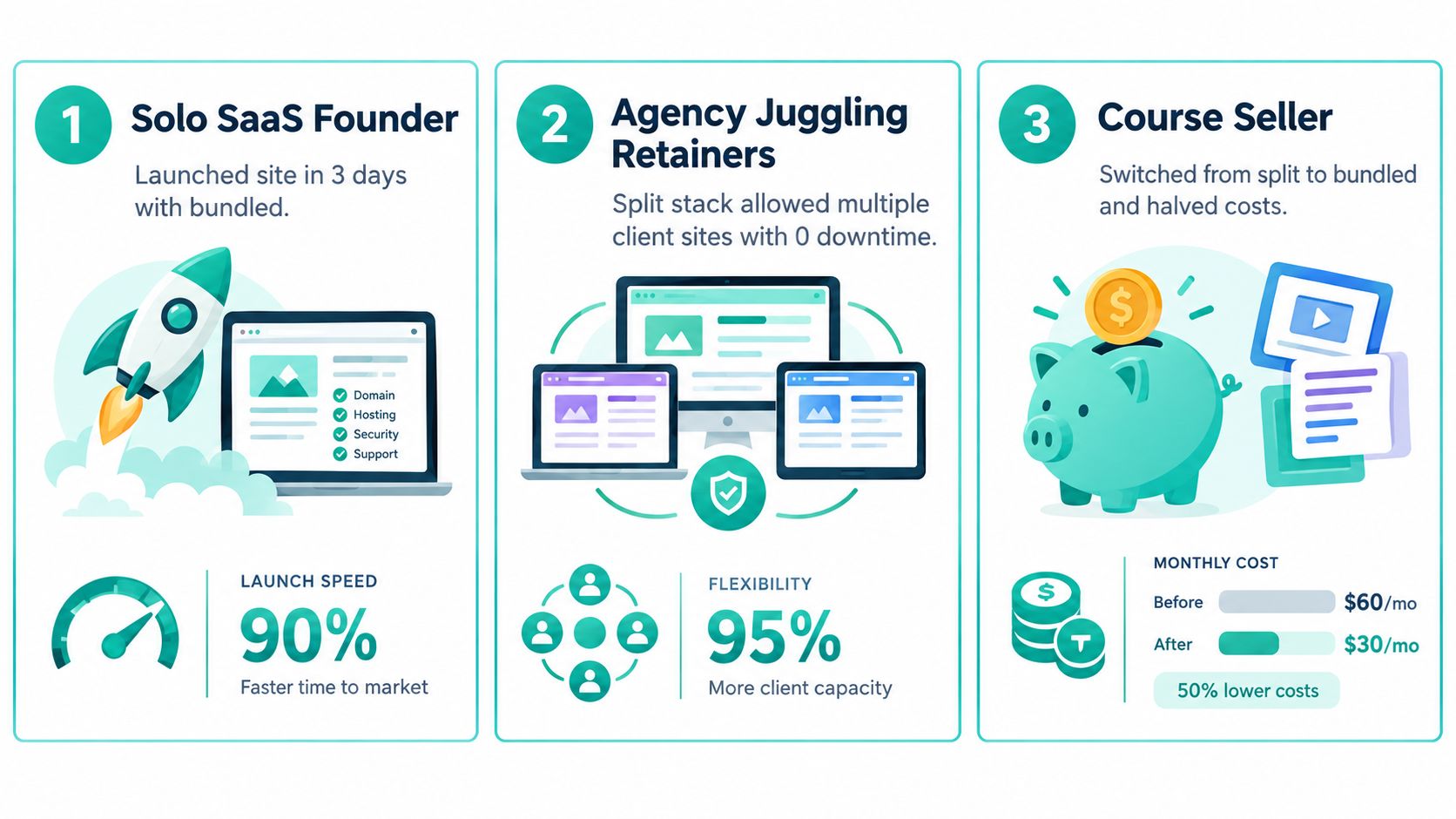
The solo SaaS founder
This founder needs a homepage, product page, docs starter, blog, and a demo CTA. They do not need a custom server setup on day one. They need credibility fast and they need to stop fiddling.
For that use case, bundled wins.
The decisive trade-off is obvious. They give up some portability in exchange for low cognitive load. That's usually the right call when the company still has more unknowns than traffic.
Twelve months later, the regret is also predictable: they want one weird integration, one custom data flow, or one layout rule the platform fights them on. The pixie dust wears off. The walls of the garden become visible.
Here's a useful primer if you're in that camp and choosing launch tools: best website builder for startups.
The agency with many client sites
The agency question is different. Internal process matters as much as page output. Billing has to stay predictable. Hand-off has to be survivable. Support has to be someone else's problem at least part of the time.
There are two good paths here, but the winner depends on service model.
A design-focused agency doing brochure sites can justify a bundled managed plan if it includes strong agency controls, client permissions, and white-label presentation. A more technical agency handling varied integrations, advanced forms, or performance-sensitive builds usually does better on a separate stack.
The regret after a year isn't usually technical. It's operational. Agencies discover that a platform either standardizes delivery beautifully or creates edge-case chaos across accounts. Pick the one that matches your service catalog, not your designer's favorite interface.
A quick walkthrough helps here:
The course creator and funnel operator
This operator lives or dies by launch windows, checkout stability, membership access, and campaign spikes. They need pages, yes. They also need precise control over redirects, scripts, caching behavior, third-party embeds, and funnel experiments.
For that use case, I usually recommend a separate stack unless the bundled platform was built specifically around funnels and ongoing automation. One option in that narrower category is Web Mage, which combines prompt-based page generation with hosted delivery, SSL, built-in split testing, and autonomous agents for SEO, speed, analytics, and conversion tuning under one plan.
The decisive trade-off is between convenience and tunability. A broad all-in-one site builder may feel tidy but struggle once launches, memberships, and campaign logic get more exotic.
If your revenue depends on launch-week behavior, don't settle for a platform that treats funnel mechanics like decorative add-ons.
The regret after a year is usually this: “I optimized for easy editing when I should've optimized for controlled execution.”
Reading a Managed Plan Without Getting Spellbound
The bundle versus split argument gets too much attention. Plan quality decides outcomes more often than architecture alone.
I've seen excellent results on managed bundled plans. I've also seen expensive garbage on “premium” stacks with ornate sales copy and weak contract language. A shiny control panel is not a protection spell.
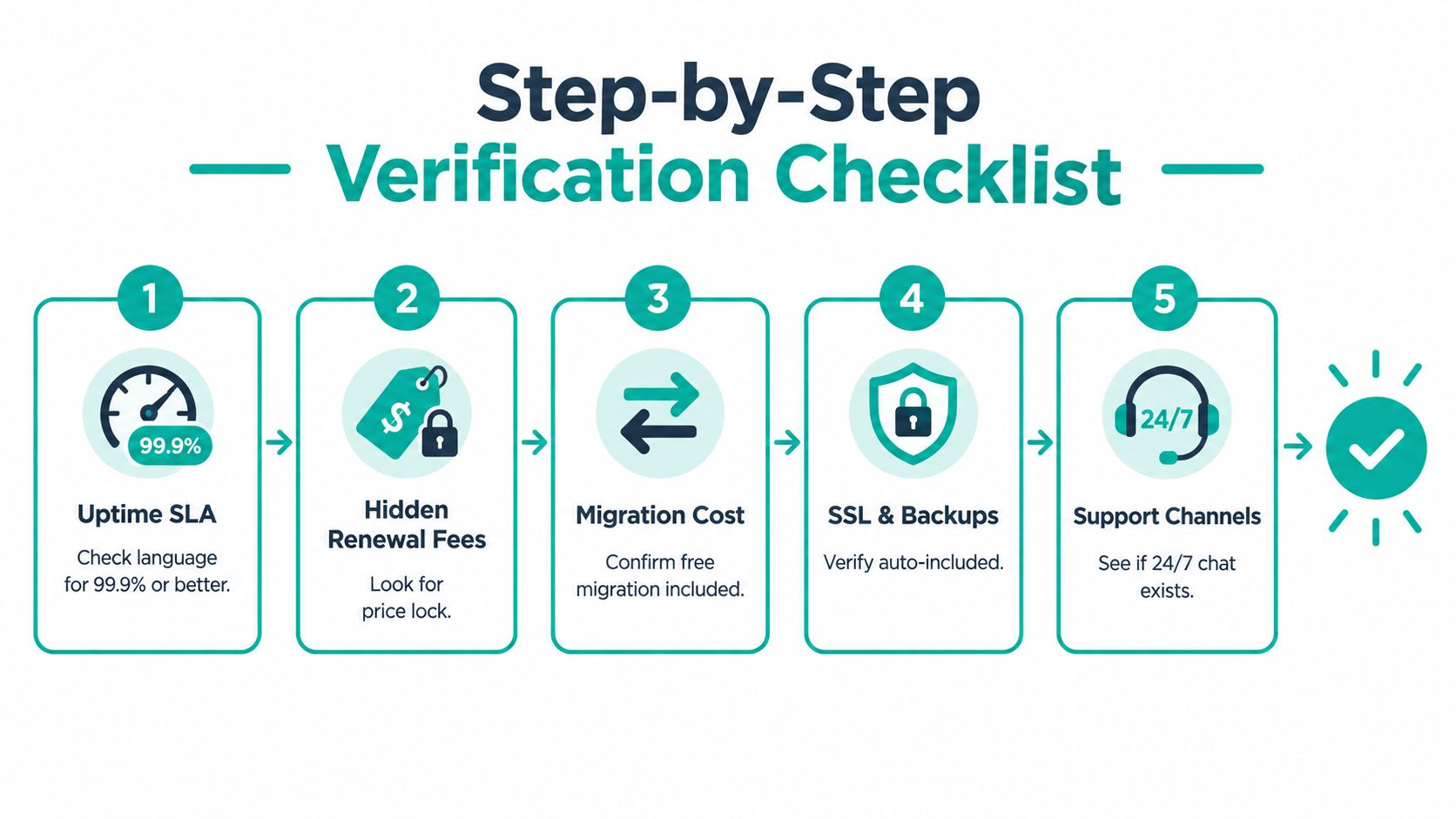
What to verify before checkout
- Uptime language: Read the SLA, not the homepage banner. Compensation often comes as tiny credits, not meaningful remedies.
- Hosting tier reality: Shared, cloud, and managed dedicated are not interchangeable. Ask what resources are isolated and what's pooled.
- Support promise: “Priority support” means nothing if there's no response-time commitment in writing.
- Migration terms: Confirm who performs migration, what content gets moved, what doesn't, and whether exit creates friction later.
- Backup ownership: Ask whether backups are exportable in a usable format or only restorable inside their ecosystem.
Red flags that deserve suspicion
Some terms should make you reach for your legal pad immediately.
- “Unlimited” with fair-use caps: That's often a soft ceiling disguised as abundance.
- Bandwidth shared across sites: Fine for hobby portfolios. Risky for agencies or operators with uneven traffic.
- Auto-renew at standard rates: Not evil, just expensive when ignored.
- Template lock-in: If designs can't travel, migration will hurt more than expected.
- App-only extensibility: If every new capability requires approved marketplace tools, future customization will be constrained by someone else's incentives.
Questions worth asking a sales rep
Ask these bluntly:
- What exactly happens if I need to leave in two years?
- Can I export content, assets, redirects, and forms in open formats?
- Which features in the demo require a higher plan?
- What optimization changes does the platform make automatically?
- Which logs, reports, or diagnostics can my team access directly?
Google's own guidance on website testing supports a measured approach to controlled changes. It says A/B testing involves testing two or more variations of a change, and that small changes such as button size, color, placement, or CTA text often have little or no effect on search snippets or rankings, according to Google guidance quoted on Readdy. That matters because vendors increasingly promise automated optimization. You need to know whether those changes stay observable and reversible.
One contract clause people miss
Review termination and export language before you sign. Founders obsess over launch support and skip the clause that governs departure. That's backward. The quality test is whether the vendor helps you leave without summoning a legal necromancer.
Which Model Should You Cast and When
The right answer is situational. That's not hedging. That's operations.
My direct recommendation by profile
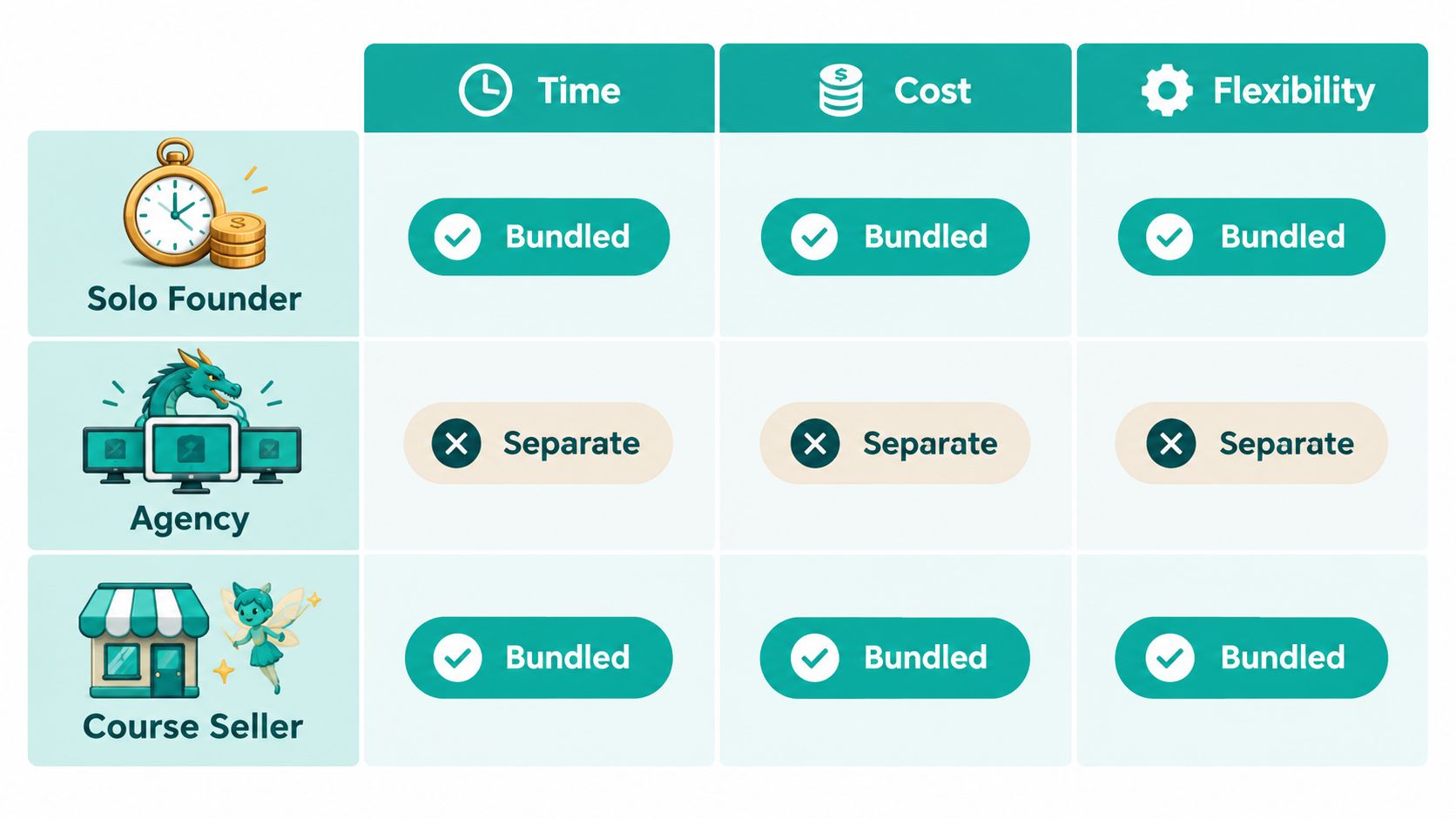
For a solo founder with a tight runway, pick a bundled website hosting and builder platform. Publish fast. Keep the monthly bill legible. Avoid turning your homepage into a side quest in systems integration.
For an agency juggling retainer clients, lean separate if your clients vary in complexity, integrations, or performance demands. Lean bundled managed if your offer is standardized and you value repeatable handoff more than deep customization.
For a course seller dependent on funnel uptime, choose the model that gives you the most confidence in launch control. In many cases that's a separate stack. In a narrower set of cases, a focused bundled funnel platform can work if it gives you testing, automation, and enough visibility into what the system is doing.
For a brand chasing custom design or multiregion performance, use a separate stack. Don't wrestle a closed builder into enterprise behavior. That spell backfires.
Four questions that make the choice clearer
Ask these before you buy anything:
- How long should this site live? If the answer is at least two years, don't optimize only for this month's launch.
- What technical capacity do we have? Not what your smartest teammate could figure out on a weekend. What you can support consistently.
- Do we need bespoke backends or unusual integrations? If yes, closed systems get cramped fast.
- Can we tolerate opaque platform changes? If hidden optimizers make you nervous, own more of the stack.
The strategic point founders ignore
This choice isn't permanent. But it gets more expensive to reverse once content, rankings, automations, forms, and internal workflows accumulate.
SEO split testing itself reflects the same principle. It usually works by selecting similar pages, applying a change to only part of them, and comparing the control group to the variant group on organic performance, often through server-side deployment rather than browser changes, as described in Search Atlas' explanation of SEO split testing. That's a useful mental model for stack choice too. Test deliberately. Don't hand your whole site to black-box automation unless you're comfortable with the platform controlling the experiment.
If you want my blunt answer, here it is. Bundled wins when speed, predictable billing, and low DevOps appetite matter most. Separate wins when control, performance tuning, and portability matter more than convenience. Pick the model you can live with for at least 24 months. That's the horizon where the enchantments wear off and the operating costs show themselves.
Web Mage offers a different take on the website hosting and builder problem: prompt-built pages and funnels, hosting and SSL in the same plan, plus built-in agents that keep tuning SEO, speed, analytics, and split tests after launch. If you want the convenience of a bundled stack without doing all the manual upkeep yourself, visit Web Mage.